Step 1
Open Twitter / X integration settings
From your selected site, open the Twitter integration panel in dashboard settings.
Twitter / X Integration
Configure link attribution accounts and mention keywords to capture social context, then correlate conversation and traffic shifts in one analytics timeline.
X integration screen showing attribution accounts, mention keywords, and current tracking connection state.
Prepare these before configuring Twitter / X tracking.
Follow this flow to configure both attribution and mentions.
Step 1
From your selected site, open the Twitter integration panel in dashboard settings.
Step 2
Use Link attribution for account-based attribution quality, or Mentions for keyword-based monitoring.
Step 3
Enter X usernames that link to your site in bio. Each username is normalized and verified before being saved.
Step 4
Add focused keywords (brand, product, campaign, @handle, or hashtag) to monitor relevant conversations.
Step 5
Your root domain is tracked automatically for mentions and shown as an auto-tracked keyword.
Step 6
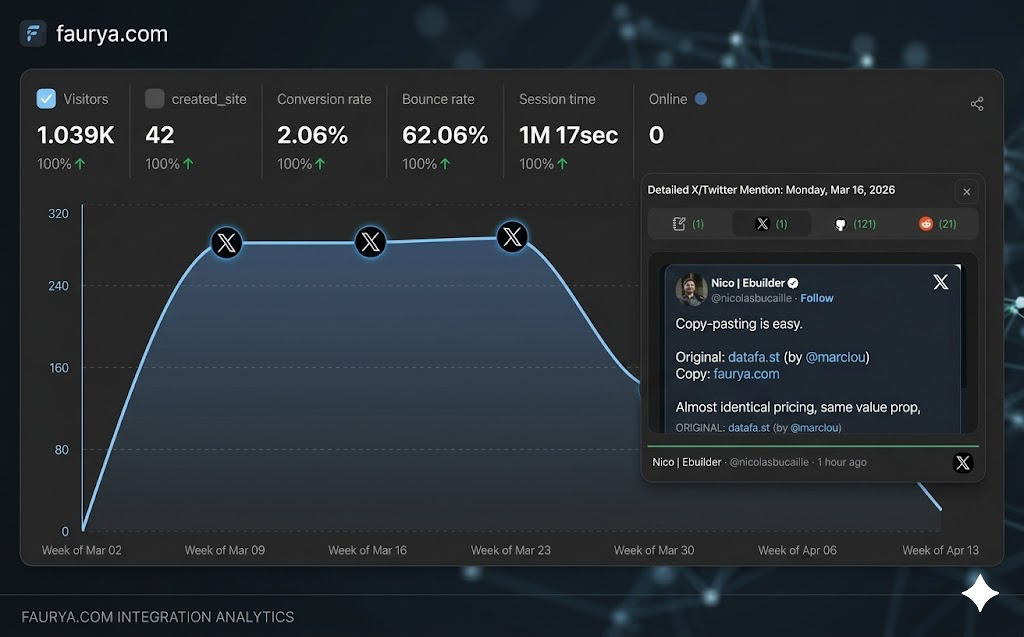
Tracked social activity is surfaced in the analytics timeline so you can compare discussion spikes with traffic movement.
How each mode behaves in the Twitter integration panel.
| Mode | User-facing behavior |
|---|---|
| Link attribution | Tracks configured X accounts that link to your site to improve attribution quality for shared links and generic short-link references. |
| Mentions | Tracks matching posts when configured keywords appear, alongside automatic root-domain mention coverage. |
| Auto domain mention | Site root domain is always tracked automatically and does not need manual keyword entry. |
| Immediate persistence | Add and remove actions save directly to settings without a separate global Save button. |
| Connected state | Integration panel shows connected status while settings are available and active. |
| Profile links | Configured usernames are clickable so teams can quickly verify external account profiles. |
Limits and checks enforced in the live Twitter settings workflow.
| Rule | Current behavior |
|---|---|
| Linked accounts limit | Up to 5 accounts |
| Username length | 1 to 15 characters |
| Username normalization | Leading @ removed, lowercase normalization, invalid chars stripped |
| Username existence check | Each account is verified before it can be added |
| Keyword limit | Up to 5 keywords |
| Keyword length | 4 to 15 characters |
| Keyword format | Letters, numbers, spaces, @, #, dot, underscore, and hyphen |
| Domain duplicate guard | Root domain keyword duplicates are blocked because domain tracking is already automatic |
Dual-mode tracking: link attribution and mentions
Verified X account onboarding for attribution quality
Automatic root-domain mention coverage
Keyword monitoring with strict limits and validation
Immediate save behavior for add/remove operations
Live connected-state visibility in settings
Direct profile links for managed X accounts
Social activity markers in the analytics timeline
Quick checks for account, keyword, and visibility issues.
Confirm length and characters first, then verify the handle exists and is not already in your configured list.
Check keyword count, length, character rules, and duplicates. Root-domain duplicates are intentionally blocked.
Verify the selected date range and timezone include recent social activity, and confirm keywords are still configured.
Add more relevant X accounts that link to your site and ensure those profiles match the traffic sources you expect.
Wait for active requests to complete before additional edits. If needed, refresh and verify the latest saved list state.
No. You can use one mode or both, depending on whether you need link attribution, mention monitoring, or both workflows together.
Link attribution focuses on selected accounts that point to your site, while mentions focus on keyword-based conversation matching.
Yes. The root domain is always auto-tracked for mentions and shown separately from manual keywords.
You can add up to 5 linked accounts and up to 5 mention keywords.
Activity appears as social markers in the analytics timeline so you can compare audience discussion against traffic and conversion behavior.
No. Add and remove actions persist settings directly in the Twitter integration workflow.