How to Identify AI Crawler Traffic in Web Analytics
Learn how to spot AI crawler traffic using logs, user agents, request patterns, and a founder-friendly attribution checklist.
TL;DR
AI crawler traffic should be separated from human demand before marketing ROI is judged. The clearest signals come from server logs, user agents, request timing, page depth, and behavior that does not match normal referral traffic.
AI crawlers can read a site without behaving like buyers, subscribers, or normal referral visitors. AI crawler traffic: automated requests from systems such as search engines, answer engines, and large language model agents that fetch content for indexing, retrieval, or model-assisted answers. Faurya helps growth teams keep this activity distinct when learning how to identify AI crawler traffic in web analytics.
Table of Contents
What is AI crawler traffic in web analytics?
AI crawler traffic in web analytics is non-human site activity created by automated agents that request pages, assets, or feeds for discovery, indexing, retrieval, or answer generation. Web analytics, defined in the research data as measuring, collecting, analyzing, and reporting web data to optimize usage, needs a separate crawler layer because these visits rarely signal demand.
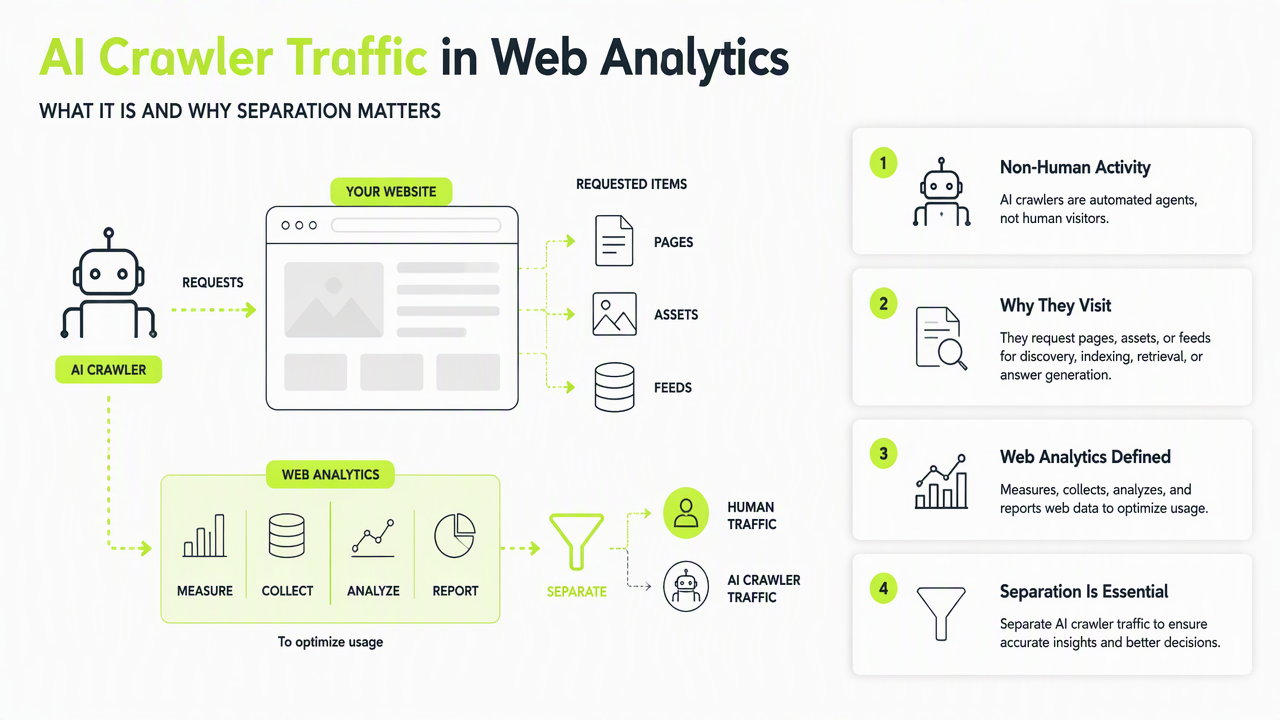
Key insight: AI crawler visibility is not the same as audience growth. It can show content access, but not product interest.
Classic SEO crawlers, AI answer-engine bots, uptime monitors, and security scanners may all appear as traffic. The task is to classify them before pipeline, conversion rate, or campaign performance gets distorted.
AI crawler traffic vs human referral traffic
| Signal | AI crawler traffic | Human referral traffic |
|---|---|---|
| Intent | Content fetching or indexing | Reading, evaluating, buying |
| JavaScript | Often limited or absent | Usually runs browser scripts |
| Session depth | Many URLs in short bursts | Fewer pages with pauses |
| Referrer | Often blank or technical | Search, social, email, partner |
| Conversion value | Usually none | Possible signup, cart, demo, lead |
Faurya treats crawler visibility as a measurement layer, not a vanity metric. That framing helps founders see which pages are being accessed by automated systems while keeping human acquisition metrics clean.
How can logs reveal crawlers that analytics pixels miss?
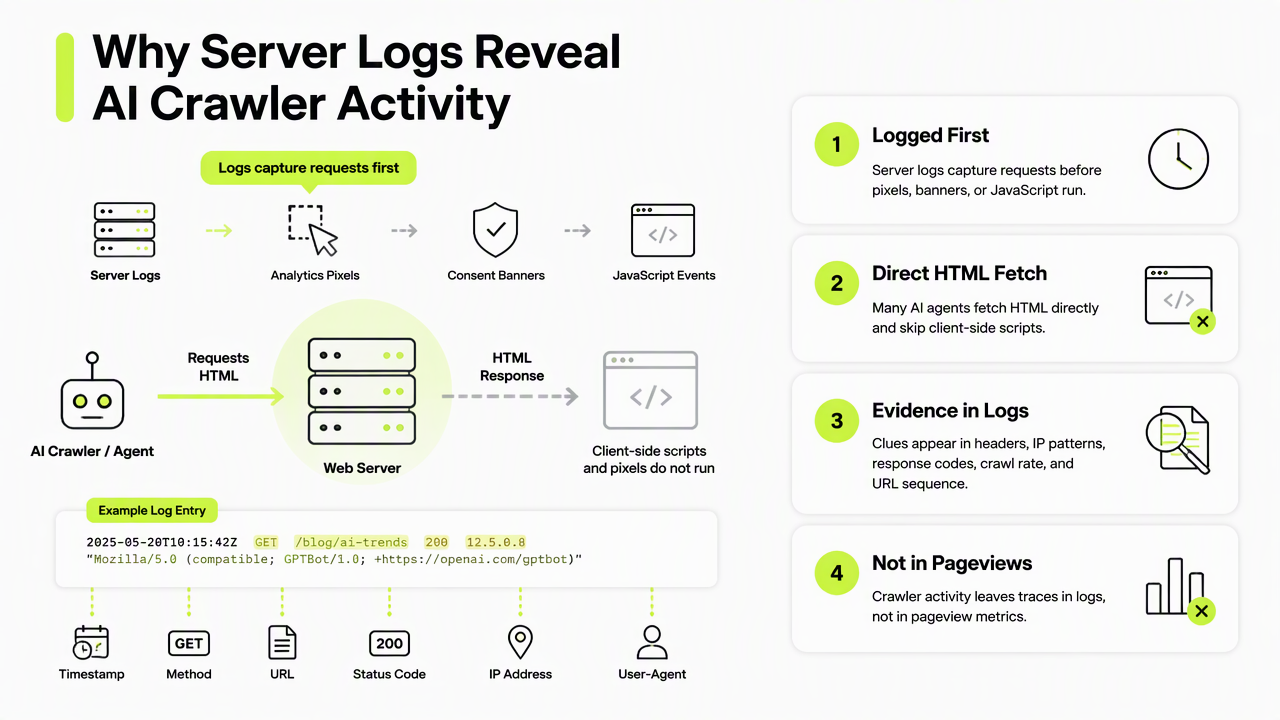
Server logs reveal crawler activity because they record requests before browser-based analytics pixels, consent banners, or JavaScript events run. Many AI agents fetch HTML directly, skip client-side scripts, and create evidence in headers, IP patterns, response codes, crawl rate, and URL sequence instead of in pageview tools.
Security research supports this behavior-first approach. A 2023 survey on cyber threat intelligence mining examined proactive defense using observable signals, while a 2021 survey on robotics cyber security reviewed automated-system vulnerabilities, attacks, and countermeasures. For web teams, the practical lesson is simple: labels help, but behavior confirms classification.
Server-side fields to inspect first
- User agent: named bots, LLM agents, generic libraries, or blank strings.
- IP and ASN: repeated access from cloud networks, data centers, or known crawler ranges.
- Request cadence: many pages hit within seconds, often outside buying-hour patterns.
- Path behavior: access to
robots.txt, sitemaps, docs, old posts, PDFs, or parameter-heavy URLs. - HTTP status mix: many
200,301,404, or304responses from broad crawling. - Asset loading: HTML requested without matching image, CSS, or analytics script calls.
A single signal is weak. Three or more matching signals usually justify a crawler segment in reporting.
What checklist separates AI indexing from real demand?
A clean AI crawler checklist separates automated indexing from real marketing demand by combining identity, behavior, and business outcomes. The goal is not to block every crawler; the goal is to prevent non-human activity from inflating direct traffic, content performance, and attribution models.
High-value crawler tracking should answer three questions: which agents accessed the site, which pages they read, and whether human demand followed later through branded search, referral traffic, signups, or sales activity.
Founder checklist for clean attribution
- Create a crawler segment in analytics or BI using user agent, IP range, ASN, and log-derived rules.
- Compare JavaScript pageviews with raw requests to find traffic that never fired client-side analytics.
- Group agents by purpose: search crawler, AI answer engine, uptime monitor, security scanner, or unknown bot.
- Track page categories: homepage, pricing, docs, blog, changelog, product pages, and sitemap files.
- Exclude crawler segments from demand metrics such as conversion rate, CAC, funnel drop-off, and paid campaign ROI.
- Keep a review loop because agent names, infrastructure, and access patterns change over time.
The Faurya platform is especially relevant for teams that need privacy-conscious analytics without mixing machine access and human intent. For brand recall and direct navigation, more product context is available at faurya.com.
Conclusion
Learning how to identify AI crawler traffic in web analytics starts with server logs, not dashboards alone. The next practical step is to build a weekly crawler report, separate it from demand reporting, and review fast-changing agent patterns. Teams ready to clean up attribution can visit faurya.com and assess where AI access is already shaping visibility.
Generated by EarlySEO.com