Do Ad Blockers Block Website Analytics? A 2026 Guide
Learn how blockers affect analytics, distinguish privacy controls from script errors, and test measurement without bypassing visitor choices.

TL;DR
Ad blockers can prevent analytics scripts or collection requests from running, but behavior varies by browser and filter settings. Test those conditions separately, compare results with business records, and respect visitors' privacy choices.
Ad blockers can block website analytics, not just advertising. For businesses evaluating marketing ROI in 2026, missing events may reflect filtering, browser protections, consent settings, or technical errors rather than fewer customers. Ad blocking: software functionality that blocks or alters online advertising through browser extensions or other browser, application, or network controls.
Table of Contents
Do ad blockers block website analytics?
Ad blockers block website analytics when their filtering rules match an analytics script or collection request. Blocking the script can prevent measurement from starting; blocking its destination can stop events from reaching the reporting service. The outcome depends on the blocker, enabled lists, browser settings, and implementation.
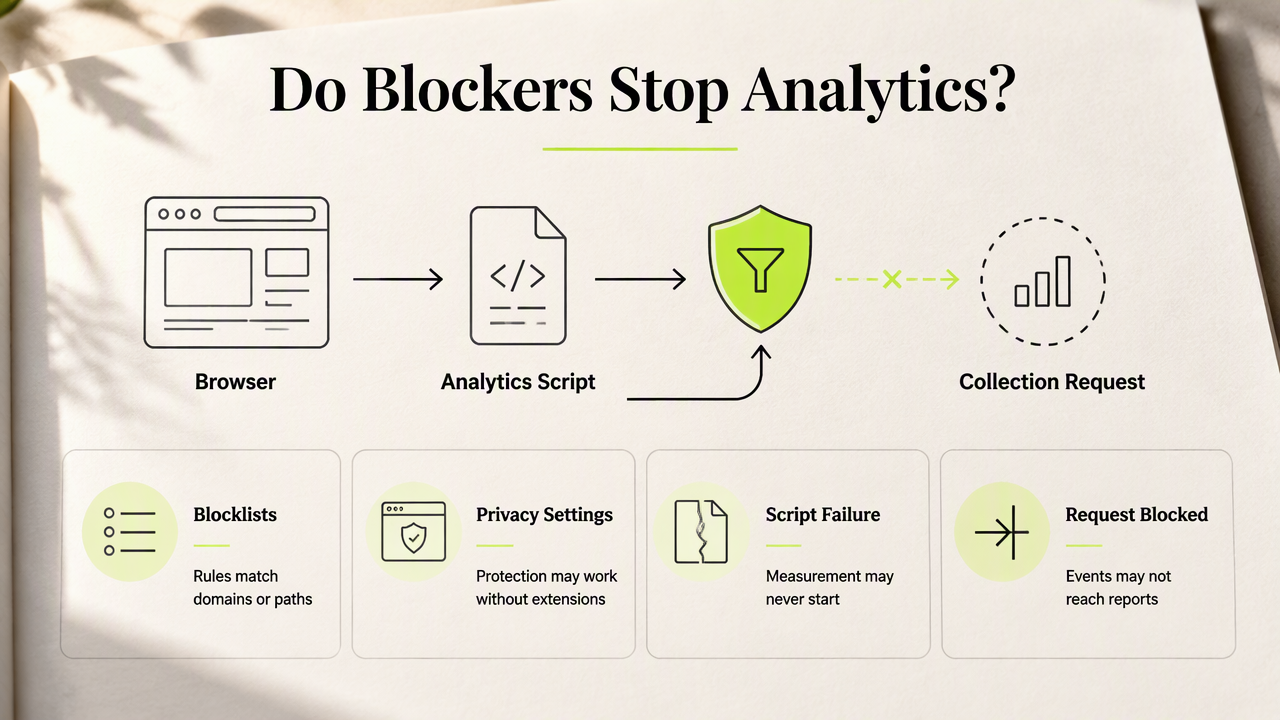
Three mechanisms that affect measurement
- Blocklists: Rules can match known tracking domains, request paths, or script names.
- Browser protections: Privacy settings can restrict tracking independently of an installed extension.
- Script failures: Loading errors or configuration mistakes can interrupt collection without any blocker involved.
A 2024 implementation article discusses requests to Google Analytics being blocked. Its workaround-oriented approach should not be treated as permission to override visitor preferences.
Google Analytics: Google's service for tracking and reporting website and app traffic and events.
There's no universal loss percentage established by the supplied evidence. A forum anecdote cannot establish a dependable benchmark for a particular store or SaaS business.
How can teams test analytics blocking?
Teams can test analytics blocking by changing one browser condition at a time and checking both requests and reported events.
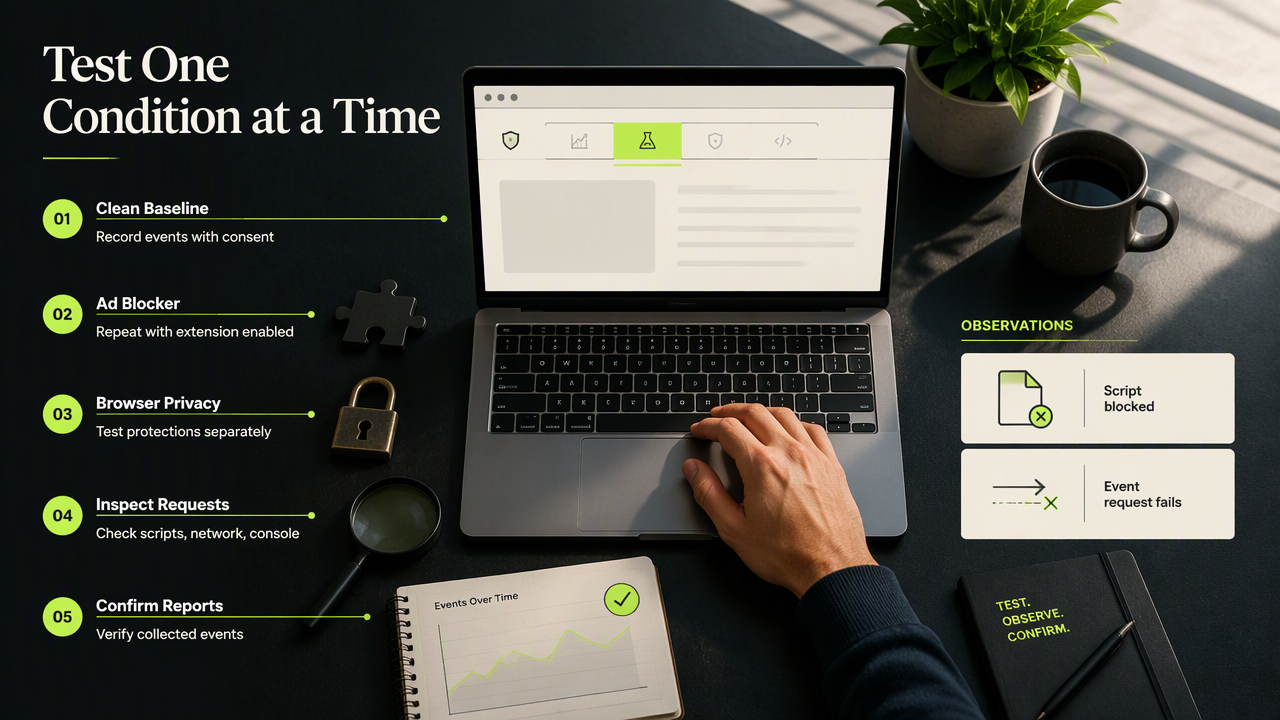
- Record a clean-browser baseline with the applicable consent choice.
- Repeat with an ad blocker enabled.
- Test browser privacy protections separately.
- Inspect script loading, network requests, and console errors.
- Confirm collection in the analytics reporting interface.
Troubleshooting matrix for missing events
| Observation | Possible explanation | Next check |
|---|---|---|
| Script request blocked | Filter rule matches the resource | Compare extension settings |
| Script loads; event request fails | Collection endpoint blocked | Inspect the destination |
| Console shows an error | Implementation failure | Review initialization |
| Requests succeed; report stays empty | Processing or configuration issue | Check property and reporting settings |
Use the same page, action, and consent state across tests. Record browser versions, extension versions, and enabled lists so another team member can repeat the result.
A missing dashboard event is a symptom, not proof that an ad blocker caused it.
Testing should identify the cause, not disguise tracking to defeat a visitor's choice.
FAQ: Privacy-friendly analytics and reliable decisions
Privacy-friendly measurement still requires clear definitions, repeatable testing, and appropriate business comparisons.
Are cookieless analytics immune to ad blockers?
Cookieless analytics are not automatically immune to filtering. Removing cookies changes how information is stored or associated, but a browser-based script still needs to load and send data. Teams should evaluate the actual implementation rather than treating a privacy-friendly label as a guarantee of complete collection.
What should teams compare with analytics reports?
Teams should compare analytics trends with completed orders, subscriptions, and other relevant business records. Those records measure different things, so exact agreement isn't necessarily expected. Define each metric first, align reporting periods, and use controlled test events to confirm that the intended customer actions are represented.
Where can teams evaluate another analytics option?
Teams considering another analytics option can review Faurya as part of a requirements-led evaluation. Useful criteria include documented collection behavior, consent handling, reporting definitions, and deployment requirements. A written checklist gives stakeholders a consistent basis for assessing suitability before selecting a platform or changing an existing implementation.
Conclusion
Start with a documented browser test and a comparison against business records. Then assess the Faurya platform against those measurement requirements; visit faurya.com to begin that evaluation. The goal should be useful, explainable reporting that respects visitor choices.
Generated by EarlySEO.com