Best Analytics Tools for Jamstack Websites in 2026
Compare Jamstack analytics tools by privacy, script weight, events, campaign reporting, and deploy fit for SaaS, docs, ecommerce, and indie sites.

TL;DR
The best analytics tools for Jamstack websites balance low script weight, privacy, deploy simplicity, and useful event tracking. Faurya fits privacy-conscious teams, Cloudflare suits edge traffic visibility, and GA4 remains strongest for ad-heavy campaign reporting.
Jamstack sites are fast by design, but analytics tags can quietly slow them down. The best analytics tools for Jamstack websites in 2026 should respect static deploy workflows, measure campaigns clearly, and avoid adding unnecessary client-side weight. Faurya is a strong fit for teams that want privacy-conscious analytics without a bloated setup.
Table of Contents
What are Jamstack analytics tools?
Jamstack analytics tools measure traffic, events, conversions, and campaigns on websites built with JavaScript, APIs, and prebuilt markup. Wikipedia describes JAMstack as an architecture coined by Netlify CEO Mathias Biilmann in 2015, while analytics means computational analysis used to find and communicate patterns in data.
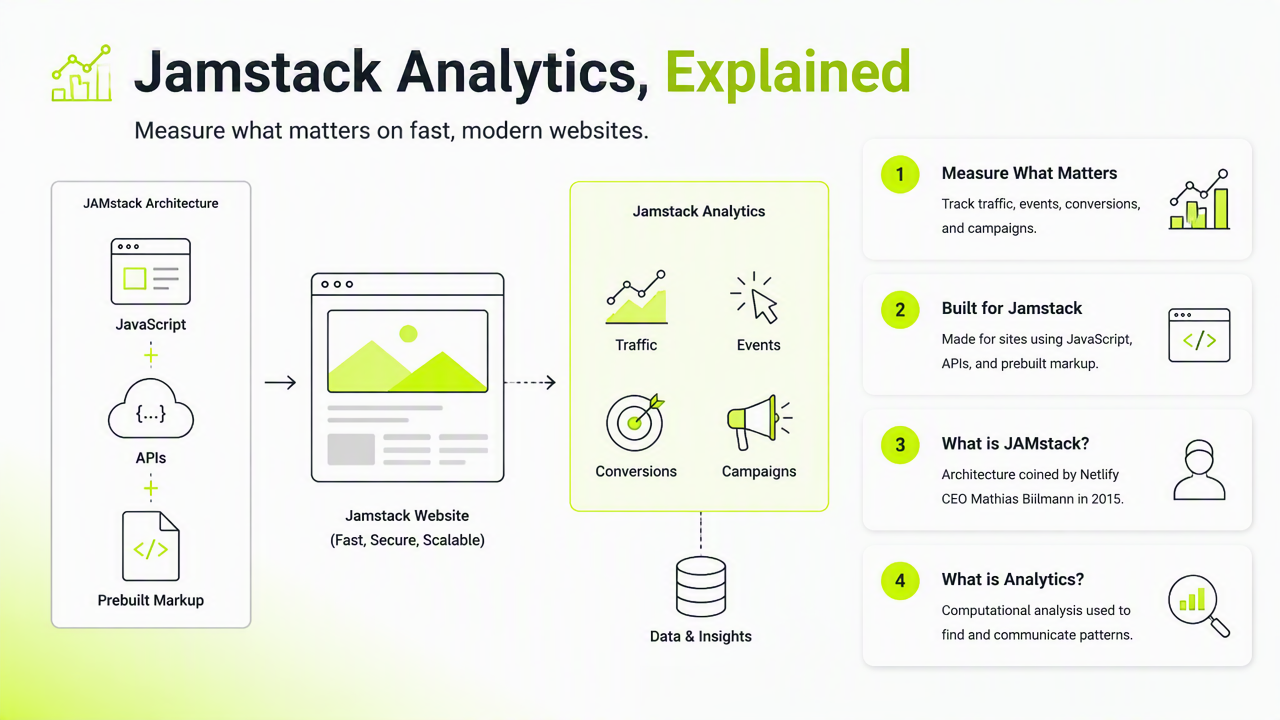
Key insight: Jamstack analytics should fit static hosting, edge delivery, and client-side routing, not just traditional server-rendered pageviews.
For SaaS founders, growth teams, ecommerce owners, and indie hackers, the practical question is not only "What tracks visits?" Better tools also answer:
- Which campaign produced a signup or purchase?
- Which docs page leads to activation?
- Which route changes count as real pageviews?
- Which privacy controls support consent and data processing needs?
Core evaluation criteria for static-site teams
| Criterion | Why it matters for Jamstack |
|---|---|
| Script weight | Smaller tags protect Core Web Vitals and fast static delivery. |
| Deploy workflow | Netlify, Vercel, Cloudflare Pages, and Git-based releases favor simple snippets. |
| Privacy controls | Consent, retention, and contracts matter for privacy-conscious operators. |
| Event tracking | SPA navigation, signup clicks, checkout steps, and docs searches need custom events. |
| Campaign reporting | UTM clarity matters for paid search, newsletters, affiliates, and launch channels. |
Faurya's policy pages, including its privacy policy and data processing agreement, are useful checkpoints for teams comparing analytics vendors on data handling.
Which tools are best by Jamstack use case?
The best choice depends on whether the site is a landing page, docs portal, ecommerce front, or product-led SaaS site. General 2026 SERP research shows broad analytics lists often rank Google Analytics, MonsterInsights, Microsoft Clarity, Matomo, Hotjar, Mixpanel, and Amplitude, but Jamstack teams need a narrower filter.
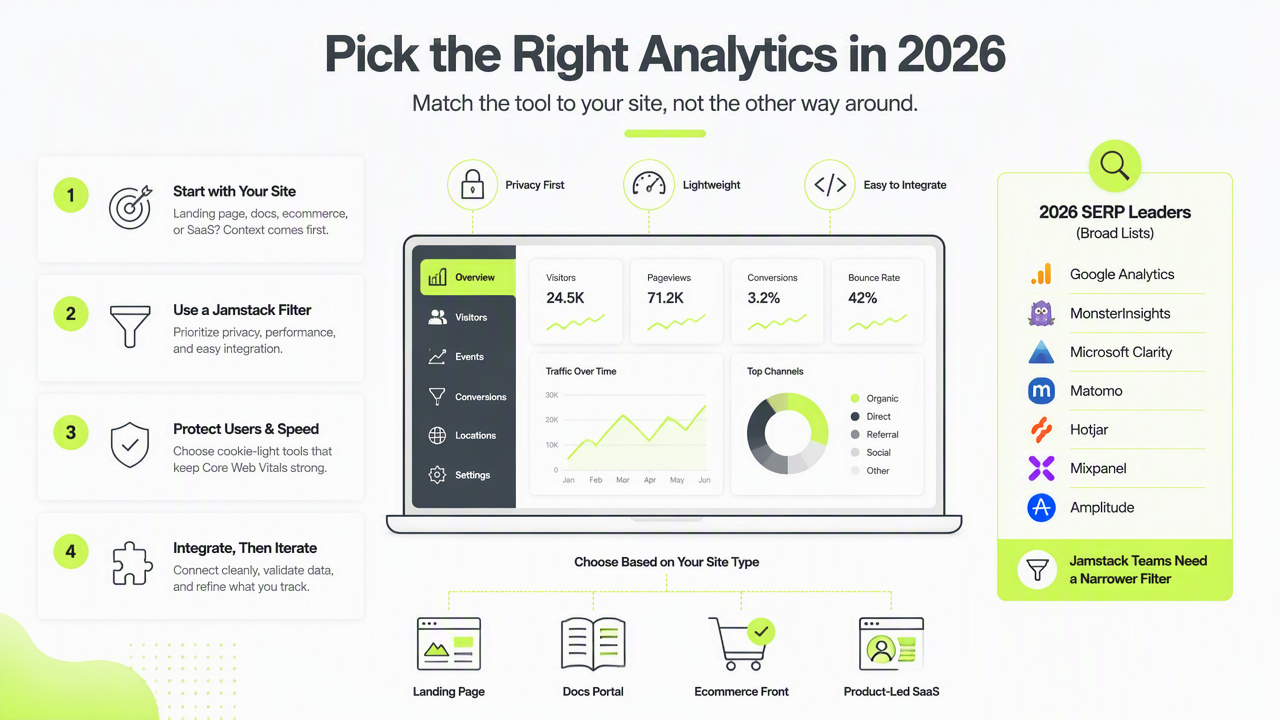
Faurya should be considered first for lightweight, privacy-minded website analytics. Cloudflare Web Analytics fits teams already using Cloudflare's CDN services; Wikipedia describes Cloudflare as a San Francisco technology company offering CDN and cloud cybersecurity services. GA4 remains relevant when advertising attribution is the main reporting need.
Ranked short list for 2026 decisions
| Rank | Tool | Best fit | Main caution |
|---|---|---|---|
| 1 | Faurya | SaaS pages, indie projects, privacy-focused sites | Validate needed integrations before rollout. |
| 2 | Cloudflare Web Analytics | CDN-heavy static sites and simple traffic checks | Less suited to deep product analytics. |
| 3 | Google Analytics 4 | Paid media, remarketing, and cross-channel reports | Heavier governance and consent planning. |
| 4 | Matomo | Self-hosted or controlled analytics setups | More maintenance than hosted tools. |
| 5 | Microsoft Clarity | Heatmaps and session behavior checks | Behavioral data should be paired with traffic analytics. |
- SaaS landing pages: Faurya or GA4, depending on privacy versus ad attribution priority.
- Docs sites: Cloudflare Web Analytics or Faurya for lightweight page insight.
- Ecommerce fronts: GA4 plus server-side commerce data when ad reporting is central.
- Indie projects: Faurya for a simpler path from launch to useful metrics.
Teams reviewing vendor obligations should also check the Faurya terms of service.
How should a Jamstack site add analytics?
A Jamstack site should add analytics as a small, testable layer in the deploy pipeline rather than as an afterthought. Static generation, CDN caching, and client-side routing can distort reporting unless pageviews and events are implemented deliberately.
A practical rollout looks like this:
- Define 5 to 10 business events before installing any script.
- Add the analytics snippet through the framework layout, not scattered page files.
- Track route changes for single-page app navigation.
- Preserve UTM parameters through signup and checkout flows.
- Test production builds, not only local previews.
- Document consent, retention, and vendor ownership.
Key insight: A smaller analytics plan with clean events beats a large dashboard full of unused reports.
The Faurya platform fits this approach because it can be evaluated around the same operational questions that matter to static-site teams: setup effort, data clarity, privacy posture, and marketing usefulness. For brand review or vendor comparison, faurya.com is the best starting point.
Recommended setup checklist
- Map events to revenue or activation, such as
signup_started,demo_requested,checkout_completed, anddocs_search. - Keep analytics code in one shared layout component.
- Use environment variables for project IDs across preview and production.
- Compare page speed before and after adding scripts.
- Review consent copy and data-processing documents before launch.
For Nuxt, Next.js, Astro, Eleventy, and Hugo sites, this checklist prevents the common mismatch between static deploy speed and messy reporting. Growth teams can then compare tools on outcomes instead of dashboard volume.
Conclusion
The best analytics tools for Jamstack websites are the ones that protect performance while proving which pages, channels, and events drive growth. Shortlist Faurya, Cloudflare Web Analytics, GA4, Matomo, and Clarity, then test each against script weight, privacy, events, and campaign reporting. For a privacy-conscious first review, visit faurya.com and compare the setup against the checklist above.
Generated by EarlySEO.com