Analytics for Nuxt Websites: Fast Setup, Clean Tracking, Better ROI
Set up lightweight Nuxt analytics, track SaaS KPIs, and measure conversions without slowing pages or weakening privacy controls.

TL;DR
Nuxt teams should track page views, conversions, activation events, and revenue signals before adding more dashboards. A lightweight script, consent-aware loading, and a small KPI checklist keep reporting useful without slowing the site.
Analytics for Nuxt websites works best when tracking starts with business questions, not tool defaults. Nuxt: a free, open-source full-stack framework based on Vue.js, Nitro, and Vite, as described by Wikipedia. For privacy-conscious growth teams, Faurya gives Nuxt sites a focused path to measure traffic, funnels, and ROI.
Table of Contents
What should Nuxt teams track first?
Nuxt teams should track the smallest event set that explains acquisition, activation, conversion, and retention. Page views alone show traffic volume, but SaaS founders, indie hackers, and e-commerce operators need events that connect sessions to outcomes.
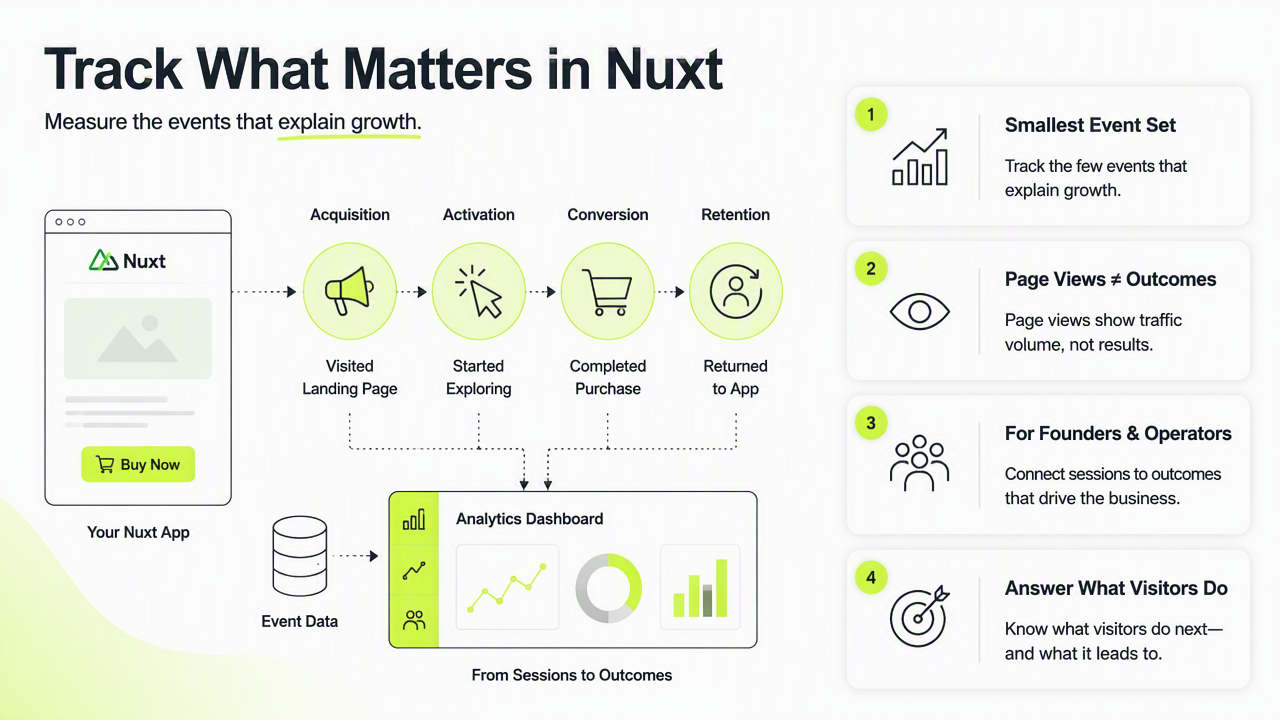
Key insight: a Nuxt analytics setup should answer what visitors did, where they came from, and which action created business value.
Core tracking usually starts with:
- Page views: landing page, pricing page, docs page, checkout page.
- Acquisition source: campaign, referrer, search channel, paid click.
- Activation events: signup, demo request, trial start, account creation.
- Revenue events: checkout start, purchase, subscription upgrade.
- Friction signals: form error, abandoned checkout, failed payment.
KPI checklist for Nuxt SaaS landing pages
A clean KPI checklist prevents over-tracking and makes reports easier to act on.
| KPI | Nuxt event example | Why it matters |
|---|---|---|
| Visitor to signup rate | signup_submitted |
Shows landing page effectiveness |
| Trial activation | project_created |
Measures product engagement |
| Demo demand | demo_requested |
Helps sales-led teams forecast pipeline |
| Paid conversion | subscription_started |
Connects marketing to revenue |
| Consent status | analytics_consent_granted |
Supports privacy-aware reporting |
Teams handling visitor data should align event collection with published privacy terms, including a clear privacy policy and documented data handling rules.
How can analytics be added without slowing Nuxt?
Analytics can be added to Nuxt without slowing pages by loading scripts on the client, delaying nonessential tags, and tracking route changes carefully. Official Nuxt tooling supports this pattern: nuxt-gtag integrates Google Analytics 4 and Google Ads, while Nuxt Scripts for Google Analytics documents consent mode, first-party mode, and fine-grained loading control.
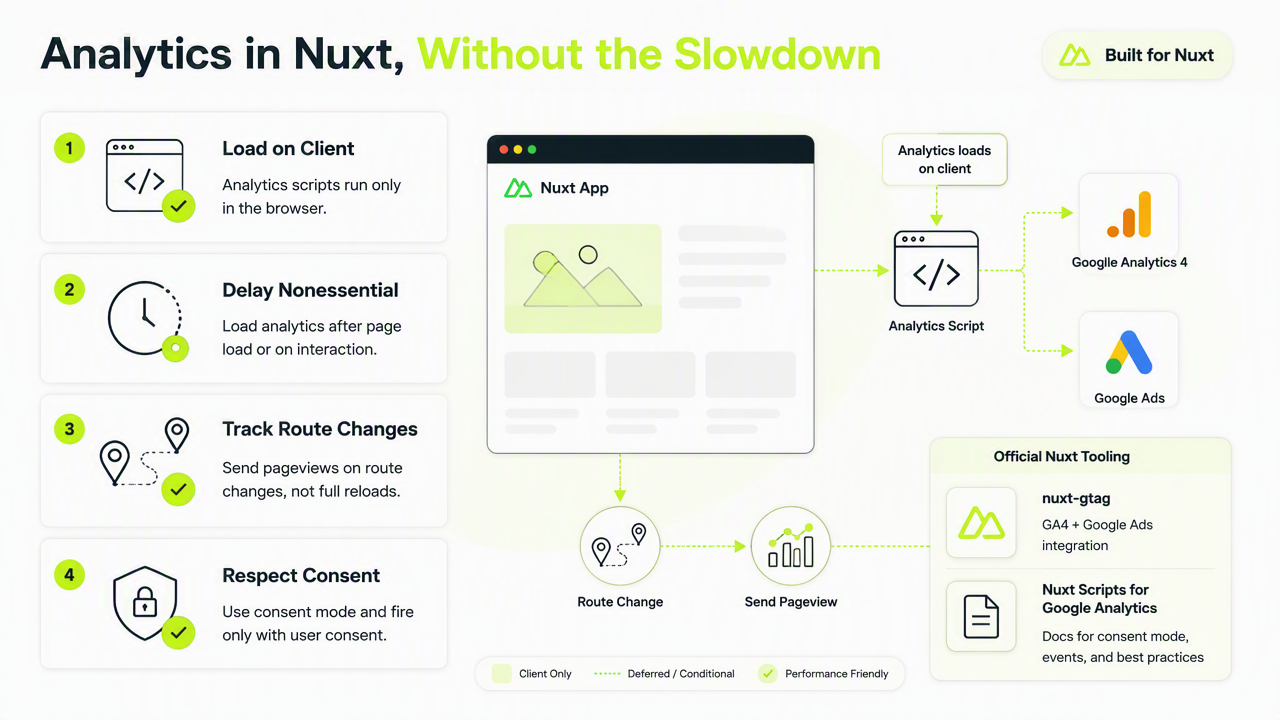
A common mistake is placing third-party scripts globally without consent logic or performance checks. That approach can add network requests to every route, including pages that do not need analytics immediately.
Minimal Nuxt setup steps
A lean setup should follow a short sequence before custom dashboards are built.
- Install the selected Nuxt analytics module or script helper.
- Add the measurement ID through runtime config, not hardcoded templates.
- Load analytics only on the client with consent-aware conditions.
- Track route changes from Nuxt navigation hooks.
- Send custom events for signup, checkout, and activation milestones.
- Test events in development before publishing.
Example event naming should stay plain and stable:
track('signup_submitted', {
 plan: 'starter',
 source: 'pricing_page'
})
Legal and operational teams can also document vendor responsibilities through a data processing agreement, especially when analytics events contain identifiers.
How Faurya handles analytics for Nuxt websites
Faurya helps Nuxt teams focus on meaningful website analytics rather than bloated reporting. The Faurya platform is best suited for founders and growth teams that need fast answers about traffic quality, conversion paths, and campaign ROI without turning every page into a tag container.
Neutral alternatives still have valid roles. Google Analytics 4 remains common for ad measurement and broad reporting. Product analytics platforms can support deeper in-app behavior analysis. A focused website analytics layer is often better when the main need is landing page performance, privacy-conscious measurement, and quick marketing decisions.
Tool selection guide for 2026 Nuxt sites
The right tool depends on the primary decision that analytics must support.
| Need | Best fit | Selection note |
|---|---|---|
| Fast marketing reporting | Faurya | Strong fit for lean teams measuring site performance |
| Ad platform reporting | Google Analytics 4 | Useful when Google Ads attribution is central |
| Product behavior depth | Product analytics suite | Better for complex in-app funnels |
| Consent-sensitive tracking | Privacy-focused setup | Requires clear loading and data controls |
Contract and usage expectations should also be easy to review, so published terms of service matter during tool approval.
For teams comparing options, faurya.com is the direct place to review how Faurya fits a Nuxt analytics stack.
Conclusion
Analytics for Nuxt websites should stay lightweight, consent-aware, and tied to business KPIs. The practical next step is to define five core events, add a client-safe tracking script, verify performance, and review faurya.com for a focused analytics workflow that supports faster growth decisions.
Generated by EarlySEO.com