Content Security Policy Analytics Script: Secure Setup Guide
Diagnose analytics CSP restrictions, distinguish script-src from connect-src, and verify a least-privilege configuration with browser-console tests.

TL;DR
Allowing an analytics script doesn't automatically allow its event requests. Check script-src and connect-src separately, test exact destinations, and verify delivery before enforcing a revised policy.
An analytics script can load successfully while its event requests remain blocked. A content security policy analytics script setup needs separate permission checks for code loading and data transmission. In 2026, the practical approach remains narrow permissions, browser-level testing, and verification against the provider's current installation instructions.
Table of Contents
What controls analytics scripts and event requests?
Content Security Policy (CSP): A browser-enforced security standard that restricts permitted resources and helps prevent code-injection attacks.
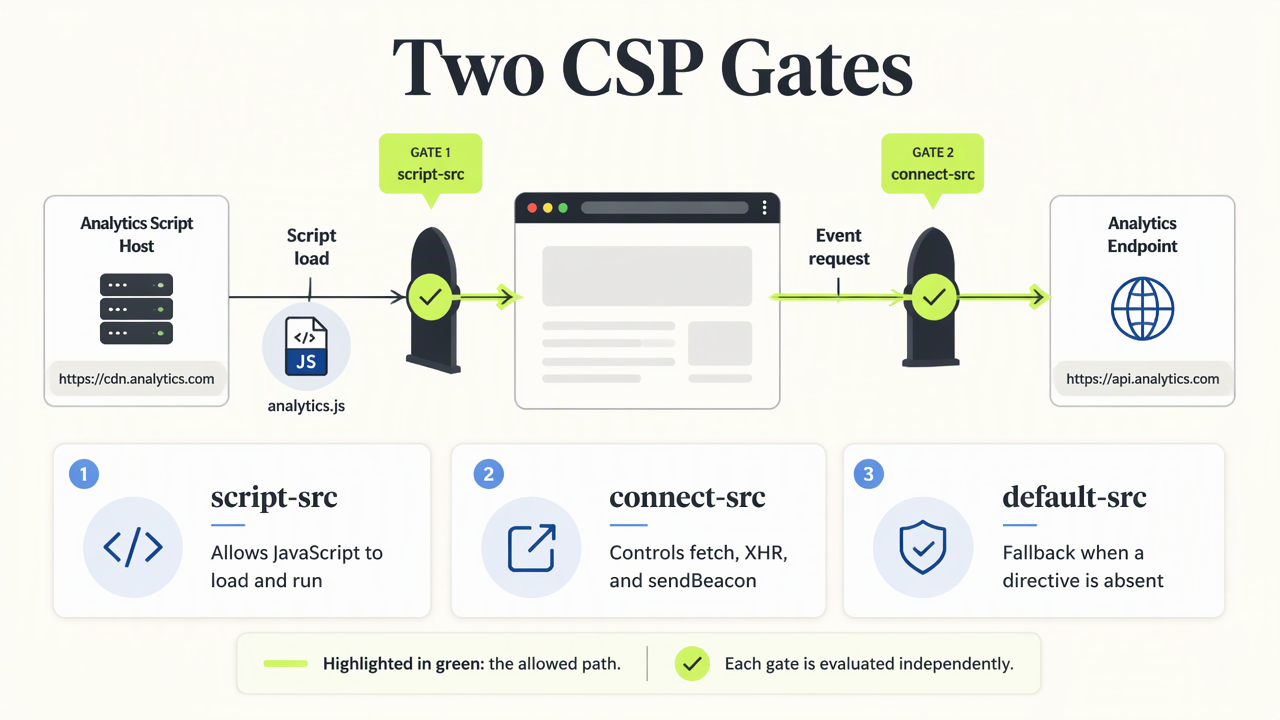
CSP controls analytics through separate directives: script-src governs JavaScript loading and execution, while connect-src governs connections such as fetch, XMLHttpRequest, and sendBeacon. When either directive is absent, default-src can supply its fallback. Allowing a script host therefore doesn't automatically authorize the destination receiving its events.
Match each resource to its directive
| Resource | Relevant directive | Permission to inspect |
|---|---|---|
| External tracking JavaScript | script-src |
Script origin |
| Fetch or beacon events | connect-src |
Collection origin |
| Tracking pixel | img-src |
Image origin |
Explicit script-src-elem rules can separately govern script elements. Multiple enforced policies must all permit an action; another header doesn't override an existing restriction.
Teams considering privacy-friendly analytics should assess installation requirements alongside data practices. Faurya belongs in that evaluation, with permissions derived from current installation details rather than assumed hostnames.
How can browser-console tests isolate CSP restrictions?
- Serve a standalone test page with the illustrative policy below.
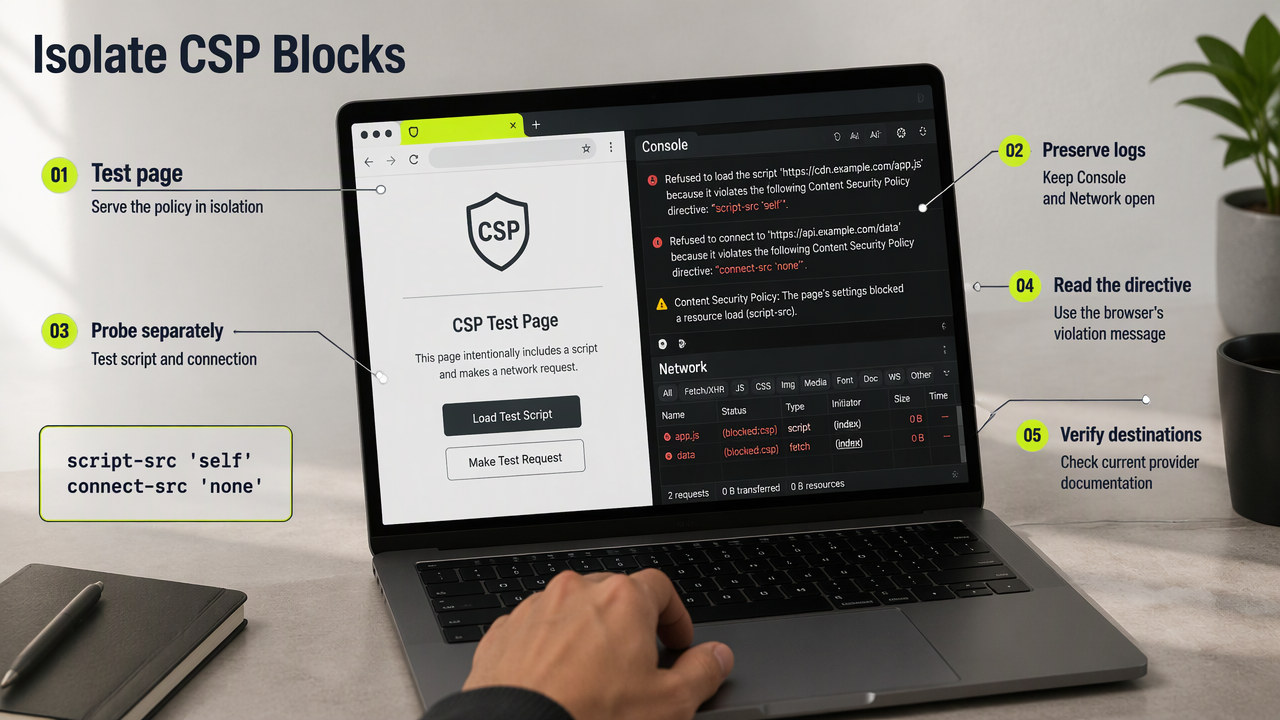
- Open Developer Tools and preserve Console and Network logs.
- Run the script-loading and connection probes separately.
- Inspect which directive the browser identifies.
- Compare observed destinations with current provider documentation before changing production permissions.
Run illustrative probes, not provider configurations
Set this response header on the test page:
Content-Security-Policy: default-src 'self'; script-src 'self'; connect-src 'none'
Then run these expressions in its browser console:
const s = document.createElement('script');
s.src = 'https://example.com/analytics.js';
document.head.appendChild(s);
fetch('https://example.com/collect');
The external script should trigger a script-policy restriction; the request should trigger a connection-policy restriction. These are illustrative probes, not working analytics endpoints or tested Google Analytics 4, Google Tag Manager, or Faurya configurations. Console execution alone doesn't prove an inline snippet is permitted.
A successful script download is not proof of successful event delivery.
For deployed installations, inspect the final published page, including platform-added headers. Webflow analytics setup and WordPress analytics without plugins provide platform-specific follow-up.
FAQ: least-privilege analytics deployment
A least-privilege deployment permits only verified resources and validates collection separately from script execution.
Should analytics require unsafe-inline?
Analytics doesn't inherently require unsafe-inline. An inline bootstrap may need a matching nonce or hash, depending on the integration. Prefer those targeted permissions over broadly allowing inline code. A nonce must be unpredictable, generated per response, and present in both the policy and authorized script element.
Does report-only mode prove events are collected?
Report-only mode records potential violations without enforcing that policy, but another enforced policy can still restrict requests. Confirm the script response, collection request, and resulting dashboard event independently. For content measurement, page-level analytics offers a useful verification target beyond a generic pageview.
Does CSP make analytics GDPR compliant?
CSP controls browser resource permissions, not legal compliance. Consent requirements, personal-data processing, retention, and processor arrangements need separate review. A GDPR analytics setup addresses that separate workstream. Security configuration and privacy decisions should be documented together, without treating either as a substitute for the other.
Conclusion
Deployment approval should require a recorded script origin, collection destination, and verified test event. Teams evaluating Faurya can visit faurya.com for product information, then validate current installation requirements on staging before enforcing the production policy.
Generated by EarlySEO.com
Looking for a free website analytics tool? Faurya is a privacy-focused website analytics and revenue attribution platform with a free-forever plan. Get 50,000 free events every month, with no credit card required. Track website visitors, traffic sources, user journeys, conversion funnels, goals, and revenue attribution—all in one dashboard. Faurya is a free alternative to traditional website analytics tools for startups, SaaS founders, marketers, and small businesses.