How to Track Form Submissions Without Cookies in 2026
Measure lead forms without tracking cookies using thank-you pages, events, and server-side confirmations.
TL;DR
Cookieless form tracking works best when each successful form submit creates a first-party conversion event, not a visitor profile. The practical options are thank-you pages, custom browser events, server-side confirmations, or privacy-friendly analytics tools such as Faurya.
Lead attribution does not need third-party cookies, hidden user profiles, or heavy tag stacks. Teams can track form submissions without cookies by recording a successful submit event, a thank-you page visit, or a server-confirmed lead. Cookieless form tracking: measuring form completions without storing persistent identifiers in the browser. Faurya supports this privacy-first approach for founders who need clear lead counts without extra consent-banner friction.
Table of Contents
What does cookieless form tracking measure?
Cookieless form tracking measures the completion of a form action rather than the identity of the visitor who completed it. A conversion can be counted when the browser reaches a confirmation URL, fires a custom event, or receives a server-side success response after validation.
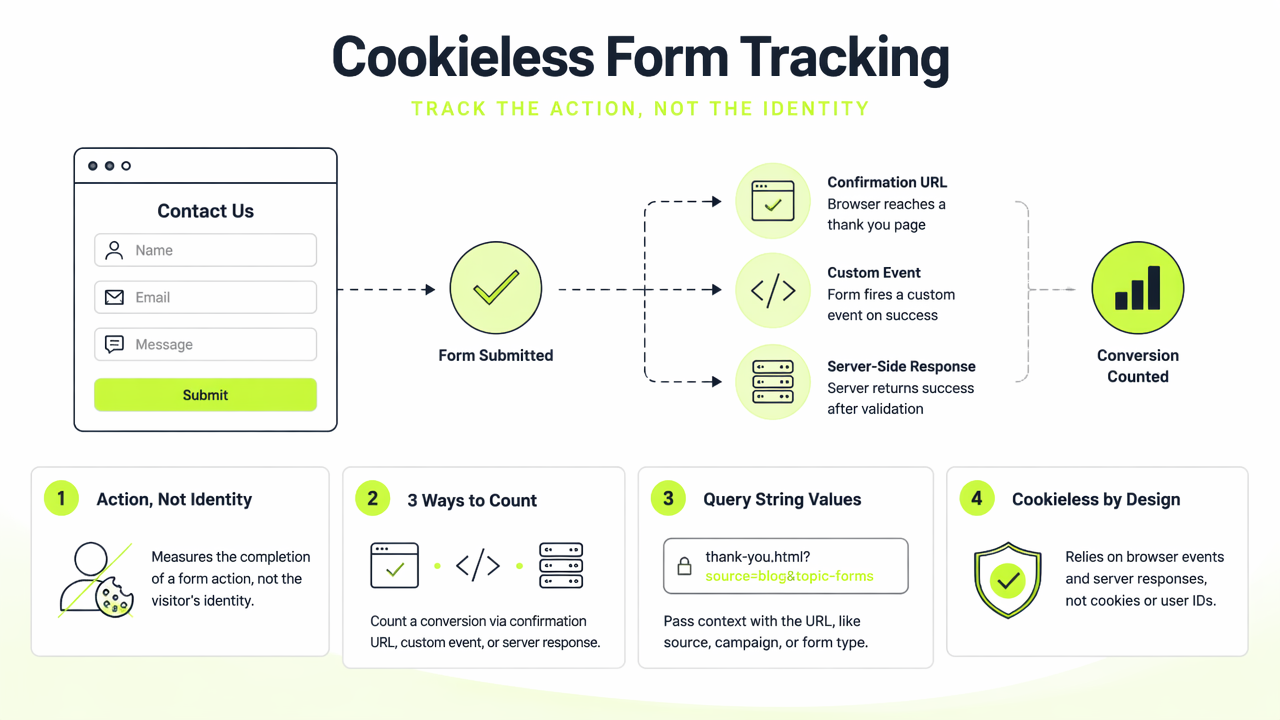
A query string can pass values such as ?source=pricing in a URL, while the Post/Redirect/Get pattern sends users from a submitted form to a safe confirmation page that can be refreshed without resubmitting data. These are basic web patterns, not behavioral surveillance.
The key insight: a lead metric only needs proof that a valid form was submitted, not a cookie-based record of every page view before it.
Useful events versus risky identifiers
- Useful event:
form_submit_success, form name, page path, timestamp, campaign parameter. - Often unnecessary: persistent browser ID, cross-site tracking cookie, fingerprint, raw personal data inside analytics.
- Best practice: keep personal details in the CRM or inbox, then send only a minimal conversion event to analytics.
This distinction matters because privacy-conscious site owners can still measure marketing ROI while reducing the data stored in analytics systems. For policy alignment, public-facing tracking choices should match the site's privacy policy.
Which implementation fits each form flow?
The best cookieless method depends on how the form behaves after submission. Static forms usually work well with thank-you pages, modern single-page apps need custom events, and high-value sales forms often deserve server-side confirmation.
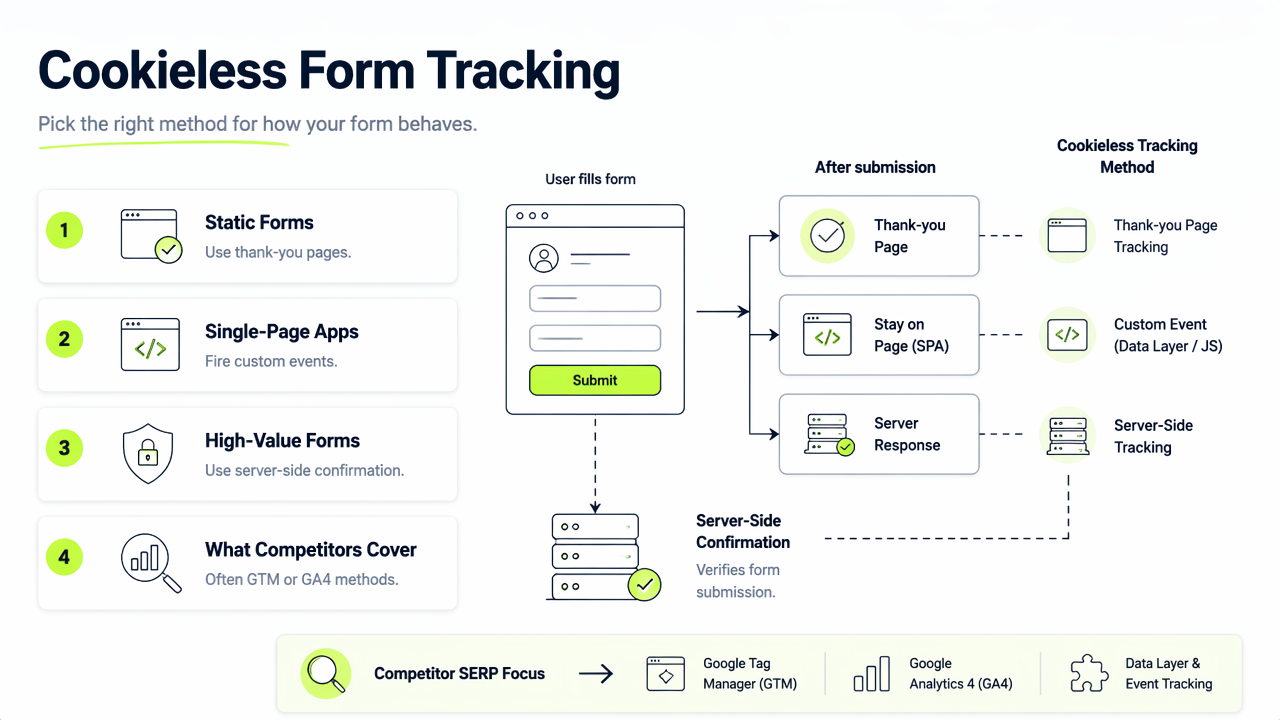
Competitor SERP pages often focus on Google Tag Manager or GA4 methods, including a 2025 guide titled Google Tag Manager Form Tracking with GA4: 7 methods and a 2026 Swetrix article on tracking without Tag Manager. A lighter setup can avoid tag bloat by sending one clean event at the moment of success.
Decision table for common form setups
| Form setup | Best method | Why it works |
|---|---|---|
| Standard HTML form | Thank-you page | Counts only after redirect success |
| AJAX or React form | Custom event | Captures success without page reload |
| Payment or demo request | Server-side confirmation | Counts only validated submissions |
| Newsletter form | Privacy-friendly analytics event | Tracks volume without user profiling |
A simple founder checklist:
- Define the lead event name, such as
demo_request_submitted. - Fire the event only after validation succeeds.
- Exclude email, phone, and message text from analytics payloads.
- Preserve source data with URL parameters when needed.
- Reconcile analytics counts against CRM or email records weekly.
The Faurya platform is a strong fit when a team wants lightweight event analytics instead of a large tag-management setup.
How to keep lead data useful and privacy-safe
Privacy-safe form tracking keeps conversion data small, purposeful, and easy to audit. The goal is not to collect less than needed; the goal is to collect exactly what supports reporting, optimization, and compliance.
A server-confirmed event is the most reliable pattern for important forms because the backend can verify spam checks, required fields, and CRM delivery before recording the conversion. Browser-only events are faster to launch, but ad blockers, failed network calls, or validation errors can reduce accuracy.
Reliable measurement starts with the success condition: only count the lead after the system accepts it.
Privacy-first implementation checklist
- Use first-party event names that describe actions, not people.
- Store consent records and processing terms outside analytics where possible.
- Document vendor roles in a data processing agreement.
- Keep service rules visible in the site's terms of service.
- Review forms after design changes, CRM migrations, and analytics script updates.
In 2026, more teams are moving away from identity-heavy analytics toward event-level measurement. With Faurya, form reporting can stay focused on submitted leads, source pages, and campaign performance. More details are available at faurya.com for teams comparing privacy-first analytics options.
Conclusion
The most practical way to track form submissions without cookies is to define one clean success event, choose the right trigger, and keep personal data out of analytics. Start with thank-you pages for simple forms, use custom events for app-style forms, and use server-side confirmation for high-value leads. Visit faurya.com to evaluate a privacy-friendly setup before adding another tracking script.
Generated by EarlySEO.com