How to Track File Downloads Without Google Analytics in 2026
Track PDFs, ebooks, whitepapers, and docs without GA using privacy-friendly events, clean naming, and consent-aware reporting.
TL;DR
Teams can measure PDF, ebook, whitepaper, and documentation downloads without Google Analytics by logging a first-party event when a file link is clicked. A clean event name, file metadata, and privacy policy alignment make reporting useful without adding unnecessary tracking complexity.
Download tracking shows which assets create real intent, not just page views. To track file downloads without Google Analytics, teams can record first-party click events for PDFs, ebooks, whitepapers, ZIP files, and documentation assets. Download: receiving data from a remote system, usually a web server, contrasts with uploading data to that system.
Table of Contents
What does privacy-friendly download tracking measure?
Privacy-friendly download tracking measures a file access event with only the context needed for reporting, such as file name, asset type, page URL, timestamp, and optional campaign source. Google Analytics is a web analytics service for traffic and event reporting, but it is not the only way to count downloads.
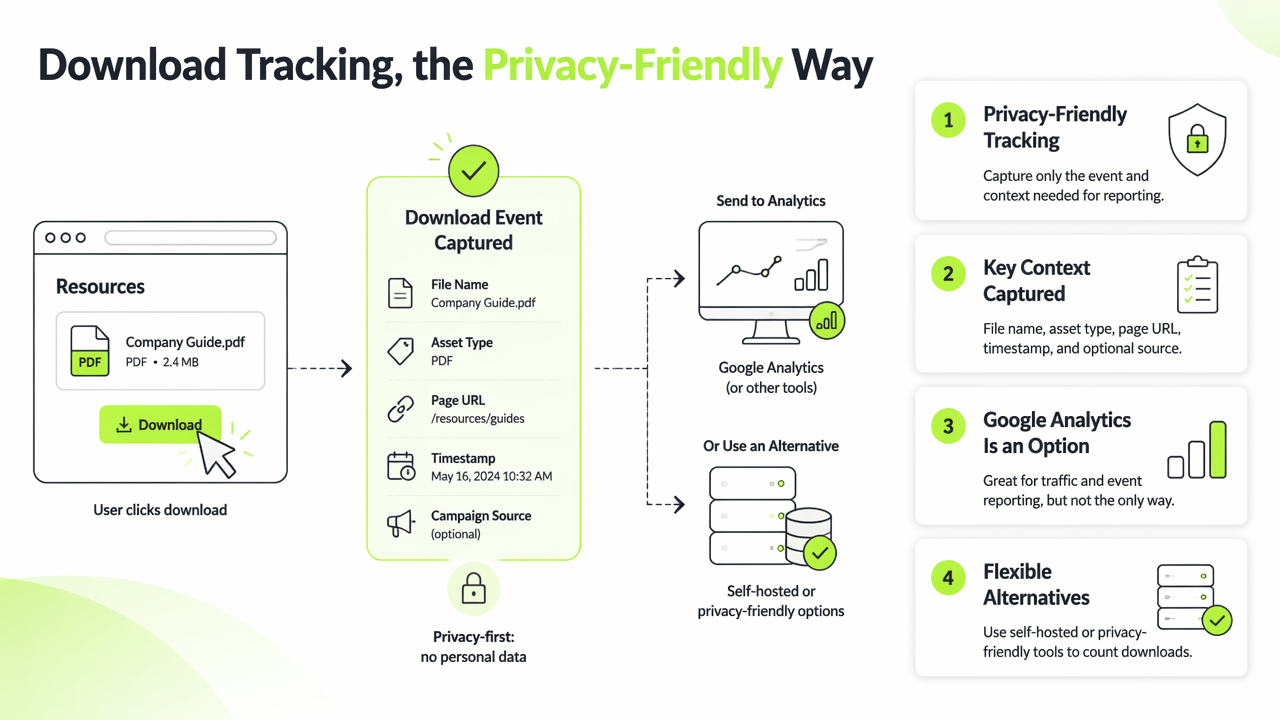
The Faurya analytics platform fits teams that want simple event reporting without building a full analytics stack. For privacy-conscious sites, event collection should match the public Faurya privacy policy standard: clear purposes, limited data, and no unnecessary personal profiles.
Key insight: a download event is strongest when it connects the asset, source page, and visitor action without collecting more data than the report needs.
Download event fields that answer business questions
| Field | Example | Why it matters |
|---|---|---|
| Event name | file_download |
Keeps reports consistent across assets |
| File type | pdf, xlsx, zip |
Separates ebooks from templates or docs |
| Asset title | pricing-guide-2026 |
Shows which content earns demand |
| Source page | /resources/pricing-guide |
Connects downloads to landing pages |
| Campaign | linkedin-q1 |
Links paid or organic campaigns to intent |
A SaaS team can count whitepaper downloads before demo requests. An ecommerce brand can measure size-guide PDFs. A documentation team can see which release notes or API references users save for later.
How can teams track file downloads without Google Analytics?
Teams can track file downloads without Google Analytics by adding a click listener to file links and sending a first-party event to a lightweight analytics endpoint. The method works for static sites, SaaS resource hubs, ecommerce guides, and help centers.
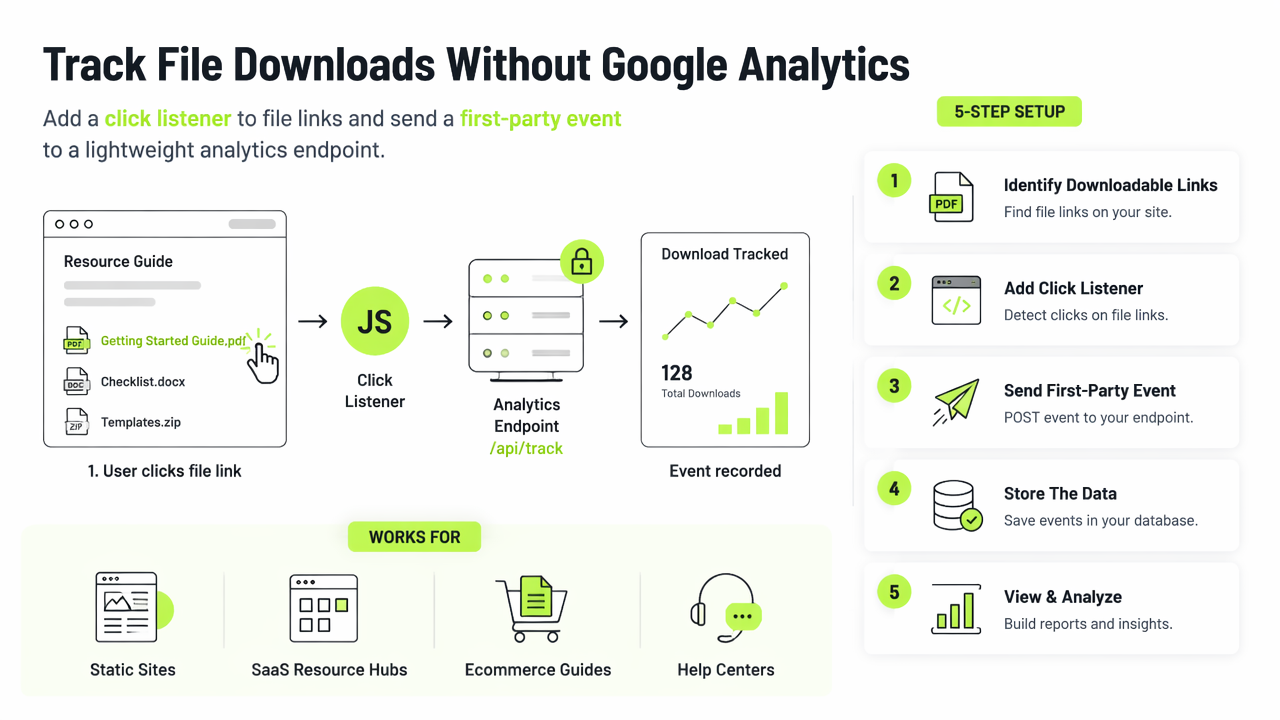
A practical setup follows five steps:
- Identify downloadable extensions, such as
.pdf,.csv,.docx,.xlsx, and.zip. - Add a click listener to matching links.
- Send an event named
file_downloadwith file metadata. - Store aggregated counts by asset and page.
- Review results weekly against leads, trials, or support deflection.
Research publishing shows why file-level reporting matters. The 2021 PRISMA-S extension paper is distributed as a PDF, like many reports and scholarly assets. A 2021 Proceedings of the IEEE review on explainable neural networks also demonstrates how important downloadable PDFs remain for technical audiences.
Simple event naming convention
Use one event name and descriptive properties rather than a different event for every file. This keeps dashboards readable.
- Event:
file_download - Properties:
file_url,file_name,file_extension,asset_category,source_page - Categories:
ebook,whitepaper,product_sheet,documentation,template
With Faurya, this structure gives marketers enough detail to compare assets while keeping reporting cleaner than a tag-heavy setup. Teams handling customer or visitor data should also align processing terms with a clear data processing agreement.
Which download reports matter most in 2026?
The most useful 2026 download reports connect content engagement to outcomes, not vanity counts. A raw PDF total helps, but segmented reporting shows which assets support pipeline, customer education, and product adoption.
Content marketers should review downloads by campaign and landing page. SaaS founders should compare lead magnet downloads with trials, demos, or newsletter signups. Documentation teams should watch repeated downloads of setup guides, migration notes, and API files because these signals can reveal education gaps.
Legal alignment also matters. Site operators should make event tracking terms understandable and consistent with public policies, including terms of service language where analytics or service usage is described.
Priority reports by team
| Team | Best report | Action from the data |
|---|---|---|
| Content marketing | Downloads by topic | Expand high-intent themes |
| SaaS growth | Downloads before signup | Improve lead magnet paths |
| Ecommerce | Downloads by product page | Fix confusing product information |
| Documentation | Downloads by doc category | Update unclear or high-demand guides |
A common misconception is that every download must become a conversion goal. Better practice treats downloads as intent signals, then compares them with later actions. Visit faurya.com when a privacy-friendly reporting setup needs to stay simple.
Conclusion
The cleanest way to track file downloads without Google Analytics is to record a first-party file_download event with consistent asset properties and review the reports by business goal. Start with PDFs, ebooks, whitepapers, and documentation files, then connect download patterns to leads, product education, and support demand. For a focused setup, evaluate Faurya and document the tracking plan before publishing the next asset campaign.
Generated by EarlySEO.com