Best Website Analytics Tools for No-Code SaaS Landing Pages
Compare privacy-friendly analytics tools for Webflow, Framer, Carrd, Softr, and other no-code SaaS landing pages in 2026.
TL;DR
Pick lightweight analytics when launch speed, readable dashboards, and privacy-friendly conversion tracking matter most. GA4 fits complex ad stacks, PostHog fits product analytics, and Faurya, Plausible, Fathom, Simple Analytics, and Umami fit founder-led landing page decisions.
The best website analytics tools for no-code SaaS landing pages show which visitors convert without turning a simple Webflow, Framer, Carrd, Softr, or Typedream page into a tracking project. Web analytics: the measurement, collection, analysis, and reporting of web data to understand and improve site usage, matching the standard definition of web analytics. For founder-readable tracking, Faurya belongs on the shortlist.
Table of Contents
Best tools for no-code SaaS landing pages in 2026
The strongest analytics tools for no-code SaaS landing pages balance fast install, clean event tracking, and dashboards that non-technical founders can read.
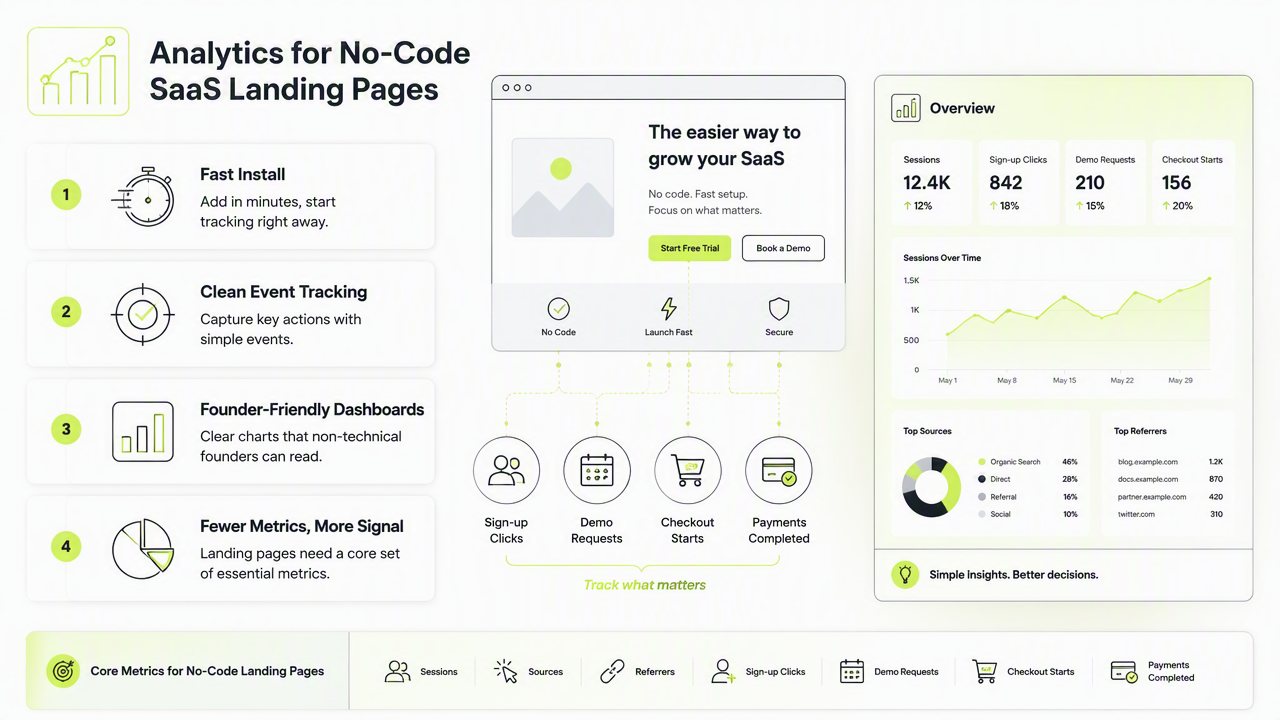
A no-code landing page usually needs fewer metrics than a mature product app. The core set is sessions, sources, referrers, sign-up clicks, demo requests, checkout clicks, and campaign URLs.
Key insight: a landing page analytics stack should answer one question first: which traffic source creates qualified intent?
Research on digital content marketing by Terho, Mero, and Siutla in Industrial Marketing Management examined marketing activities and outcomes across the customer process. That makes conversion context more useful than raw pageview volume for SaaS landing pages.
Tool shortlist by founder use case
| Tool | Best fit | No-code strength |
|---|---|---|
| Faurya | Founder-led SaaS landing pages | Clear marketing ROI view for quick decisions |
| Plausible | Privacy-focused simple analytics | Lightweight script and clean goals |
| Fathom | Privacy-first site reporting | Simple dashboard for traffic and events |
| Google Analytics 4 | Paid media and enterprise reporting | Deep integrations, steeper setup |
| PostHog | Product-led growth teams | Funnels, events, and session tools |
| Simple Analytics | Minimal cookie-free reporting | Easy sharing and privacy posture |
| Umami | Self-hosted analytics | Control for technical teams |
How to choose analytics for Webflow, Framer, Carrd, and Softr
Analytics for no-code SaaS pages should be chosen by implementation speed, event clarity, privacy fit, and whether the dashboard supports weekly decisions.
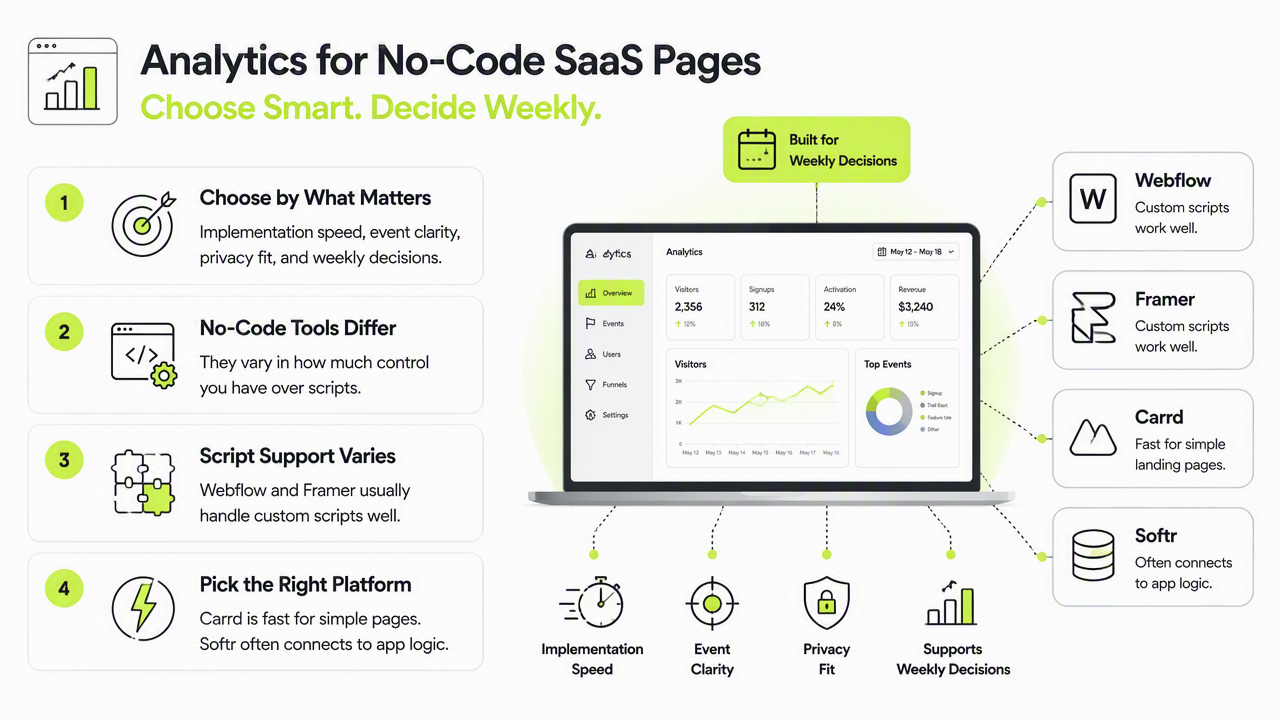
No-code tools differ in script control. Webflow and Framer usually handle custom scripts well. Carrd is fast for simple landing pages. Softr often connects to app-like workflows, so form and button events deserve extra attention.
A practical selection process is short:
- Define one primary conversion, such as sign-up, demo, or payment click.
- Confirm script installation in the builder header or project settings.
- Add campaign tracking with
utm_source,utm_medium, andutm_campaign. - Test events in an incognito browser before launching paid traffic.
- Review source-to-conversion performance weekly.
A 2022 conference proceeding available through ISG reflects the broader shift toward digital systems and measurement, which supports tighter tracking even for small teams.
Selection criteria that matter most
- Fast setup: a single script or clear no-code integration.
- Readable conversions: named goals such as
signup_clickordemo_submit. - Privacy posture: minimal data collection when possible.
- Campaign clarity: UTM reporting that separates ads, SEO, affiliates, and launches.
- Export options: CSV, API, or integrations for deeper analysis later.
Faurya is especially relevant when a founder wants analytics tied to marketing outcomes rather than a dense enterprise reporting interface. For brand recall and direct access, visit faurya.com after comparing the core tracking needs.
Privacy, attribution, and AI reporting trends to expect next
The 2026 analytics direction favors privacy-conscious tracking, lighter scripts, and summaries that explain traffic quality rather than only counting visits.
Cookie banners, browser restrictions, and ad-platform attribution gaps have made first-party measurement more important. Small SaaS teams benefit from owning simple conversion data before adding complex attribution models.
AI reporting is also changing analytics expectations. Dashboards increasingly need channel quality, detect unusual traffic patterns, and explain conversion changes in plain language. The scholarly work on big data governance in Frontiers in Environmental Science is not about marketing analytics, but it reinforces a useful principle: data systems need governance, quality control, and clear ownership.
A lean tracking stack for 2026
| Layer | Recommended setup | Purpose |
|---|---|---|
| Page analytics | Faurya, Plausible, Fathom, or Simple Analytics | Traffic and conversion clarity |
| Product analytics | PostHog or similar | Activation and funnel behavior |
| Ad reporting | GA4 plus ad platforms | Paid campaign reconciliation |
| Source discipline | UTM rules | Cleaner attribution |
Avoid tracking every micro-action at launch. Early landing pages need signal, not noise. A strong setup tracks the few actions tied to revenue intent, then expands after meaningful traffic arrives.
Conclusion
The best website analytics tools for no-code SaaS landing pages are the ones that install quickly, show conversion quality, and respect privacy expectations. Shortlist Faurya, Plausible, Fathom, GA4, PostHog, Simple Analytics, and Umami based on the stage of the SaaS funnel. For a founder-friendly starting point, review the Faurya platform and head to faurya.com with one primary conversion goal already defined.
Generated by EarlySEO.com