Automatic Double Tracking in Website Analytics: Causes, Symptoms, and Fixes
Learn what automatic double tracking means in analytics, why duplicate events happen, and how privacy-first tools deduplicate pageviews and conversions.

TL;DR
Automatic double tracking in analytics means one real visitor action is recorded twice or more. The fastest fix is to find the duplicate source, assign stable event IDs, and use a privacy-first analytics setup that deduplicates pageviews and conversions before reporting.
A duplicated conversion can make a paid campaign look profitable when it is not. Automatic double tracking: in website analytics, this means one pageview, click, form submit, or purchase is captured more than once by tracking code, tag managers, consent tools, or server-side events.
Table of Contents
What is automatic double tracking in analytics?
Automatic double tracking is the accidental duplication of analytics events, where one user action creates two or more records in a dashboard. The term is different from the music-production meaning found in top SERP results, where automatic double-tracking refers to an analogue recording technique that enhances voices or instruments during mixing.
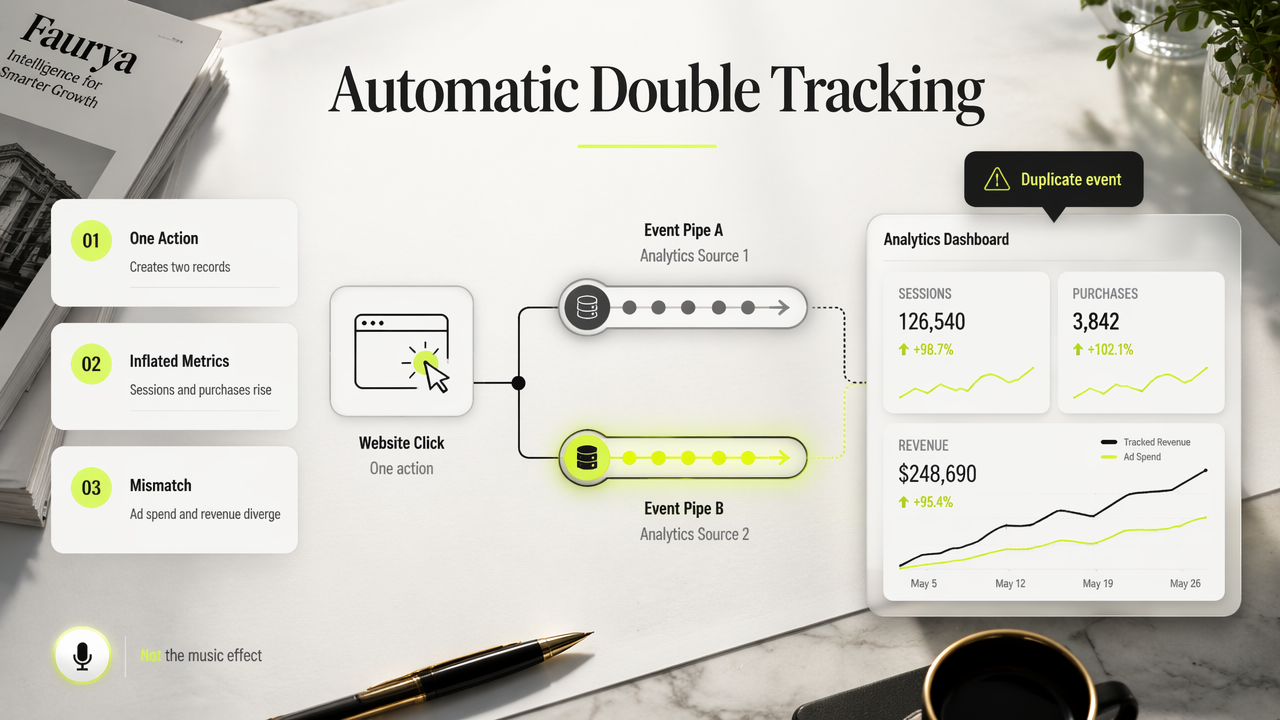
Analytics teams usually notice the issue through inflated sessions, duplicate purchases, strange conversion rates, or paid media numbers that do not match backend revenue.
Key insight: duplicate tracking is not a reporting nuisance; it can change budget decisions, attribution models, and growth forecasts.
A clean setup starts with one source of truth for pageviews and one source of truth for conversions. Privacy-conscious site owners also need a lawful processing basis, clear documentation, and controlled event collection, not silent duplication.
Analytics meaning versus audio meaning
Double tracking: an audio recording method where a performer records along with a prior performance to create a bigger sound.
Automatic double-tracking: an audio technique that uses tape delay to simulate doubled performance.
Analytics double tracking: a measurement error where duplicate event records inflate metrics.
For privacy-first measurement, Faurya focuses on lightweight analytics and clearer visitor data without pushing teams toward bloated tracking stacks.
What causes duplicate website events?
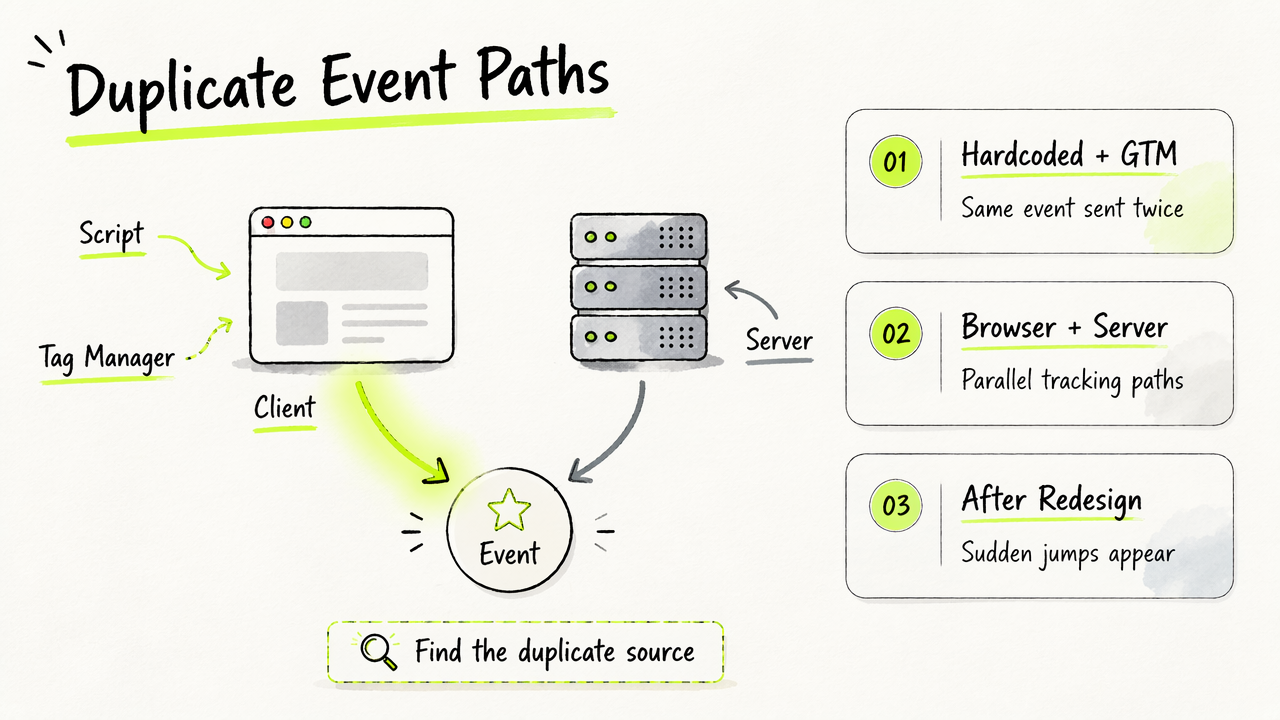
Duplicate website events usually come from overlapping tracking paths, not from one mysterious bug. The most common pattern is simple: the same event is sent from two places, such as a hardcoded script and Google Tag Manager, or from both browser and server tracking.
Research for this topic found only 179 SERP results, with many high-ranking pages about Abbey Road-style vocal effects rather than analytics diagnosis. That gap makes a practical checklist more useful for founders, marketers, and e-commerce operators.
Symptoms often appear as sudden metric jumps after a redesign, consent-banner change, tag-manager update, or migration to server-side tracking.
Cause, symptom, and fix table
| Cause | Dashboard symptom | Practical fix |
|---|---|---|
| Duplicate scripts | Pageviews nearly double overnight | Keep one analytics snippet per page |
| GTM plus hardcoded tags | Same event appears from two sources | Move ownership to one deployment path |
| SPA route changes | Virtual pageviews fire twice | Track route changes once per navigation |
| Consent tool replay | Events fire before and after consent | Gate event firing behind one consent state |
| Client plus server events | Purchases duplicate in reports | Send a shared event_id and deduplicate |
A short audit usually finds the source faster than dashboard filtering:
- Open the browser network panel.
- Complete one target action.
- Count outbound analytics requests.
- Compare event names, IDs, and timestamps.
- Remove or merge the duplicate sender.
How should analytics tools deduplicate events in 2026?
Analytics tools should deduplicate events by combining stable event IDs, timestamp windows, source rules, and privacy-aware processing. A strong system does not merely hide duplicate rows; it prevents duplicate events from reaching core reports where acquisition, activation, and revenue decisions are made.
Clean analytics also matters as AI-assisted reporting becomes normal. A 2021 Journal of Big Data review by Alzubaidi, Zhang, and Humaidi examined deep learning concepts, challenges, applications, and future directions, which reinforces a broader point for analytics: automated interpretation depends on clean input data (source).
Privacy-first deduplication checklist
A 2026-ready analytics setup should include:
- Unique
event_idvalues for conversions. - One official owner for each event.
- Separate rules for pageviews, clicks, and purchases.
- Consent-aware firing logic.
- Documentation for data handling and retention.
The Faurya platform fits this model by keeping measurement focused and privacy-aware. Site owners evaluating governance can review the Faurya privacy policy, data processing agreement, and terms of service before connecting analytics to marketing ROI workflows.
Conclusion
Automatic double tracking should be treated as a measurement defect, not a normal variance. The next step is a one-action audit: trigger one pageview, one form submit, and one purchase, then verify that each produces one record. For privacy-first analytics with cleaner reporting, visit faurya.com and compare current event flows against the checklist above.
Generated by EarlySEO.com