Website Analytics for SvelteKit Marketing Sites
Track SvelteKit routes, campaigns, and conversions without hurting speed or privacy. A concise 2026 setup guide for founders and growth teams.

TL;DR
SvelteKit marketing sites need analytics that captures client-side route changes, campaign source data, and conversion events without adding heavy scripts. A privacy-first setup should define events before launch, validate every route transition, and document data handling for buyers and regulators.
Website analytics for SvelteKit marketing sites fails when teams treat a fast app like a static brochure site. Web analytics: the measurement, collection, analysis, and reporting of web data to understand and improve website usage. Faurya fits teams that need lightweight marketing measurement without turning a SvelteKit site into a slow tag container.
Table of Contents
What should SvelteKit marketing analytics track?
SvelteKit marketing analytics should track route views, campaign attribution, and conversion events as separate signals because SvelteKit navigation can happen without a full browser reload. Competitor guides often stop at Google Analytics installation, while founders need a measurement plan tied to revenue, privacy, and launch validation.
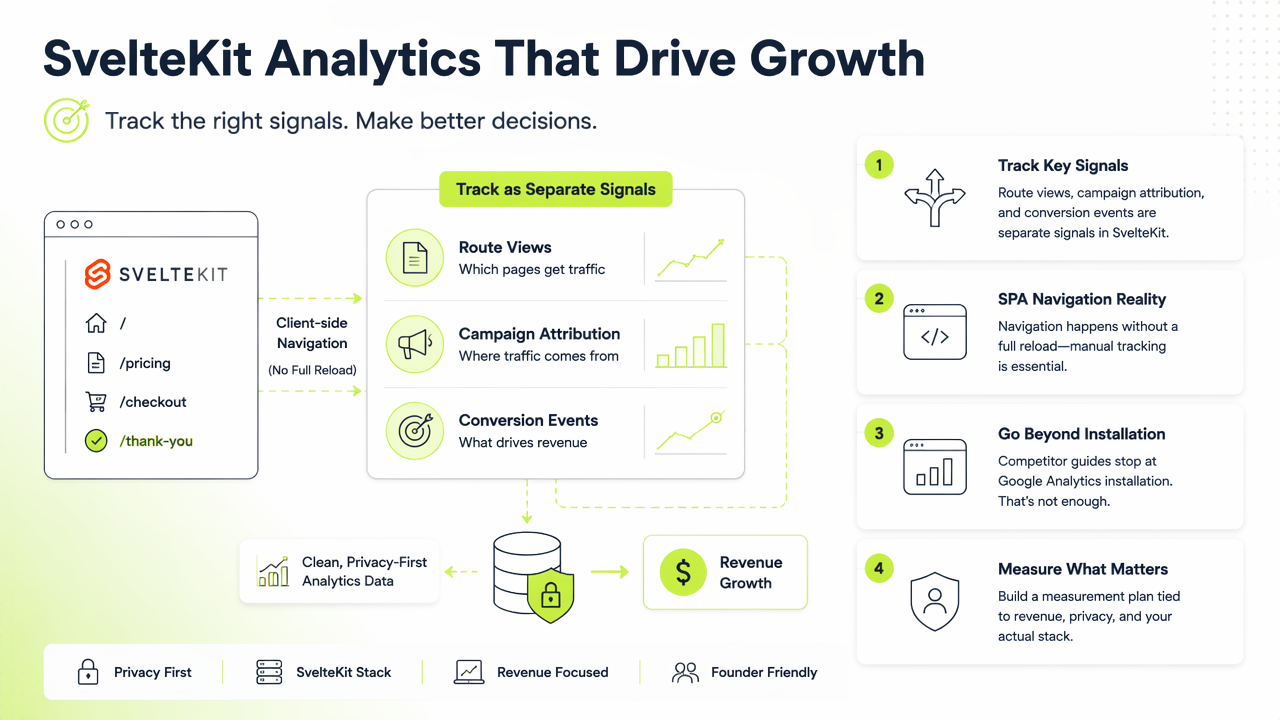
Key insight: a SvelteKit marketing site should measure decisions, not just visits.
A practical setup starts with five entities:
- Route view: each visited path after initial load and client-side navigation.
- Campaign source:
utm_source,utm_medium,utm_campaign, and referrer. - Lead event: form submit, demo request, checkout start, or signup.
- Content engagement: pricing clicks, docs clicks, and comparison-page scrolls.
- Consent state: analytics allowed, denied, or not required under the chosen policy.
Core measurement checklist for launch
| Signal | Why it matters | SvelteKit note |
|---|---|---|
| Page view | Shows landing-page demand | Fire on initial load and route changes |
| UTM data | Connects campaigns to visits | Store before navigation changes state |
| Conversion event | Proves marketing ROI | Name events consistently |
| Consent state | Supports privacy review | Align with the site privacy policy |
How should analytics be installed in SvelteKit?
Analytics should be installed in SvelteKit by loading the script only in the browser, tracking the first page view, then sending a new page view after each client-side route change. SvelteKit's app behavior explains why a simple script paste can undercount navigation paths.
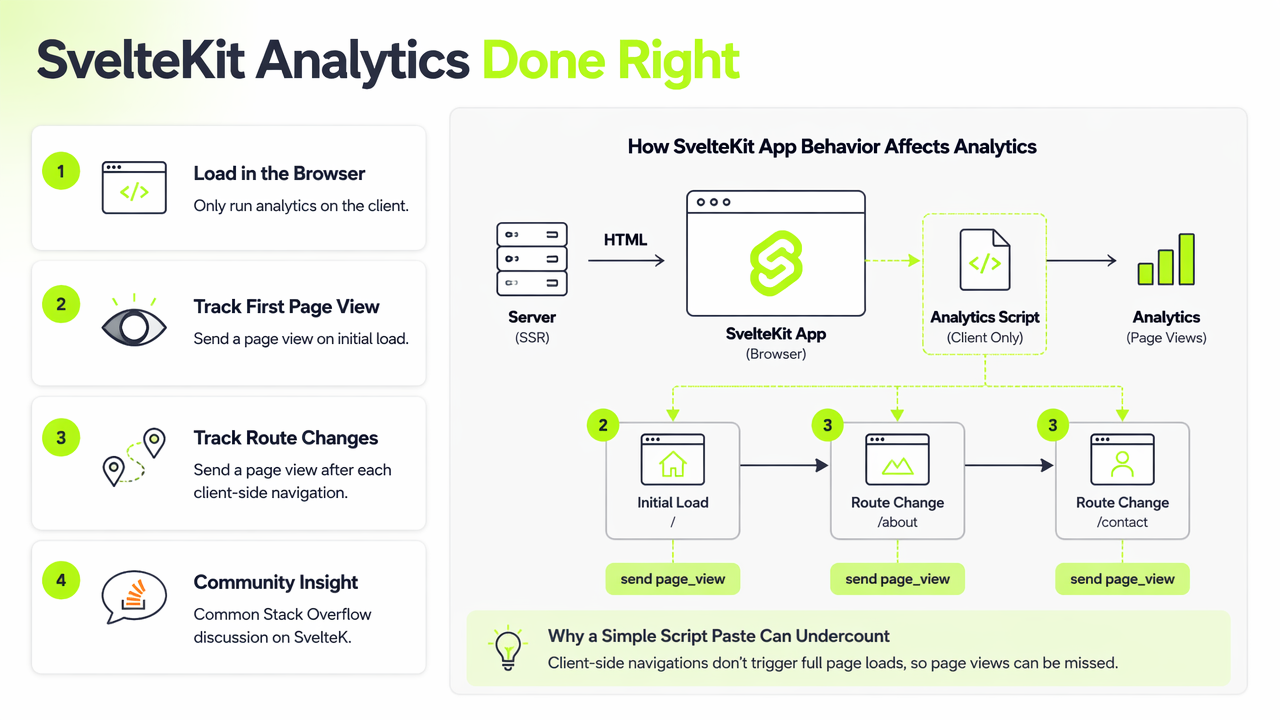
A common Stack Overflow discussion on SvelteKit link tracking reflects the core issue: route transitions may not behave like traditional page loads. For marketing sites, the safer approach is explicit tracking inside the app shell or a shared analytics module.
Faurya can sit in this flow as the analytics layer that receives clean events rather than messy page-state guesses.
Route tracking pattern for SvelteKit teams
- Load analytics only after
browseris true. - Send the first route view after the app mounts.
- Use SvelteKit navigation hooks to detect route changes.
- Send the current path, referrer, title, and campaign fields.
- Fire named events for forms, trials, purchases, and outbound clicks.
- Test production builds, not only local development.
afterNavigate is commonly used for route-aware measurement because it can run after SvelteKit changes pages on the client. The event layer should stay small, typed, and reviewed before launch.
How does privacy-first attribution work in 2026?
Privacy-first attribution works by collecting only the marketing data needed to answer business questions, then documenting how that data is processed. In 2026, small SaaS and ecommerce teams need campaign clarity, but buyers also expect plain-language privacy practices and vendor accountability.
The Faurya platform is relevant here because privacy-conscious site owners often want analytics that avoids excessive tracking while still showing which campaigns create leads. Legal and operational review should connect the tracking plan to the data processing agreement and the service relationship described in the terms of service.
A 2025 TechRxiv review by Partha Pratim Ray examined vibe coding fundamentals, current methods, challenges, and future directions in AI-assisted development. The lesson for analytics work is practical: generated implementation code still needs human review for consent logic, event names, and production behavior, as described in the TechRxiv paper.
Attribution rules worth documenting
- Keep UTM naming rules short and shared across paid, email, and affiliate campaigns.
- Attribute conversions to the first useful landing page and the latest campaign touch when both matter.
- Exclude internal traffic, test submissions, and staging domains.
- Record consent behavior before events are sent.
- Review dashboards after each release, campaign launch, or pricing-page change.
Clean attribution makes marketing spend easier to defend without expanding data collection beyond the site's real needs.
Conclusion
Website analytics for SvelteKit marketing sites should be planned like product instrumentation: define events, wire route tracking, validate attribution, and document privacy choices. For a focused setup, compare current tracking needs against Faurya, then visit faurya.com to choose the smallest analytics plan that still answers revenue questions.
Generated by EarlySEO.com